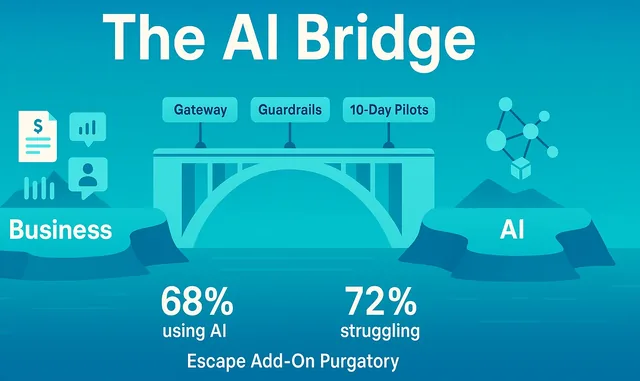
The AI Bridge: Why 68% of SMBs Are Using AI But 72% Are Failing—And What to Do About It
A comprehensive guide to escaping Add-On Purgatory and building AI capability that actually works
The Central Paradox: 68% of small business owners are already using AI, yet 72% report AI integration and usage as their top challenge. This isn't an access problem or an education problem—it's a translation problem. And the confusion isn't accidental.
Table of Contents
- The AI Paradox: Understanding the 68-72 Gap
- Add-On Purgatory: How We Got Here
- The Economic Inversion: Why Custom Is Now Cheaper Than SaaS
- The Missing Role: Introducing the AI Bridge
- Three Patterns That Actually Work
- The Toolkit: Enterprise Governance on SMB Budgets
- RAG Applications: Real Business Value
- Governance That Doesn't Suffocate Innovation
- Your 90-Day Implementation Plan
- Case Studies and Examples
1. The AI Paradox: Understanding the 68-72 Gap
You've bought the AI add-ons. The meeting transcriber that promised to revolutionize team productivity. The Zoom AI assistant that would capture every action item. Maybe even the Microsoft Copilot upgrade that would transform how your team works.
Each vendor had compelling demos. Each promised productivity gains, smoother workflows, better insights. The ROI calculators looked impressive.
Yet here you are, six to twelve months later, looking at subscription invoices that total thousands per month—and honestly asking yourself: what actually changed?
You're not alone. And more importantly, you're not wrong.
The Numbers That Should Make Us All Pause
68% of small business owners are already using AI (Fox Business, 2025)
72% report AI integration and usage as their top challenge (Service Direct, 2025)
66% believe adopting AI is essential for staying competitive (ColorWhistle)
55% used AI in 2025, up from 39% in 2024 (41% year-over-year increase)
Look at those numbers carefully. Adoption is high and accelerating. The technology is clearly accessible. The barriers to entry have fallen dramatically. Leaders feel the competitive pressure and believe AI is essential.
Yet simultaneously, nearly three-quarters are struggling with integration and usage.
This is not an access problem. Small businesses can easily sign up for AI tools—the market is flooded with them.
This is not an education problem in the traditional sense. There are countless tutorials, webinars, and courses about "AI for business."
This is something else entirely. And understanding what it actually is will save you thousands of dollars and countless hours of frustration.
The Three Barriers That Keep SMBs Stuck
When researchers dig into why 72% are struggling, three barriers consistently emerge:
48% struggle to choose the right tools (Salesforce). When you don't know what you actually need, every tool looks equally plausible—and equally risky. Vendors know this. Their solution? Make the tool do everything. Become a Swiss Army knife of AI features. You end up paying for 90 features you'll never use to get the 3 you actually need.
46% express data privacy and security concerns (Salesforce). This fear is entirely justified. When you plug your business into someone else's platform, you're trusting them with your data, your processes, and increasingly, your customer relationships. One data breach, one policy change, one acquisition by a larger company—and you're exposed.
41% cite lack of technical expertise (Salesforce). Here's where the translation problem becomes crystal clear. It's not that SMB leaders lack intelligence or capability. They're experts in their industries. They understand their customers, operations, and competitive dynamics deeply. What they lack is translation—the ability to convert business problems into AI solutions and AI capabilities into business outcomes.
What's Really Happening: The Translation Gap
The gap isn't between current state and AI adoption. The gap is between:
- What business leaders need: "Solve this customer service bottleneck" or "Reduce time spent on invoice processing"
- What they ask for: "We need an AI chatbot" or "We need to automate our workflow"
- What vendors sell them: Feature-rich platforms with impressive demos
- What would actually work: Targeted interfaces at specific process edges, with clear metrics and governance
Business leaders are fluent in the language of revenue, costs, customer satisfaction, operational efficiency. They think in quarters, budgets, competitive positioning.
AI systems speak the language of embeddings, context windows, retrieval augmentation, fine-tuning, tokens. They operate in milliseconds, probability distributions, and vector spaces.
These are two different worlds with two different vocabularies. And the gap between them is where money gets wasted, projects fail, and 72% end up struggling despite having adopted AI.
"The vendors profit from your confusion. The consultants profit from perpetual strategy. The gap in the market—the desperate need—is for translators who build governable systems and then hand over the keys."
2. Add-On Purgatory: How We Got Here
Let me paint a familiar picture. You'll recognize it because you've probably lived some version of it.
Act One: The Initial Purchase
Your team uses Zoom for meetings. You get an email—or see a banner in the app—announcing new AI capabilities. Transcripts. Action items. Meeting summaries. "Unlock the power of AI" for just $24 per user per month.
You run the math. You have 25 people. That's $600/month, or $7,200 per year. Not trivial, but if it genuinely improves productivity, it could be worth it.
The demo looks good. The testimonials are positive. Your competitors are probably doing it. You don't want to be left behind.
You buy it.
Act Two: The Reality
Three months in, here's what you actually have:
- Transcripts of meetings that people could already access via recording (and rarely did, because watching an hour-long meeting recording isn't actually more efficient than attending it)
- Action items extracted from discussions—but they still require someone to manually follow up, assign them in your project management system, and ensure completion
- Summaries that capture what was said but miss the nuance of what was actually decided, the unspoken concerns, the political dynamics that shaped the conversation
You save maybe 15 minutes per week per person. Maybe. On a good week. When people remember to check the AI summaries. When the transcription is accurate. When the action items aren't duplicates of what's already in your task system.
The value density—the actual outcome per dollar spent—is weak.
But you keep paying. Because:
- Canceling feels like admitting you made a mistake
- Everyone else seems to be doing it
- Maybe you're just not using it right
- Maybe it will get better with the next update
- You're already overwhelmed; evaluating alternatives feels like another project
Act Three: The Multiplication
Now your accounting software announces AI features. Your CRM adds an AI assistant. Your email platform introduces AI-powered writing suggestions. Microsoft offers Copilot. Google offers Workspace AI.
Each one costs $15-$30 per user per month. Each one promises productivity gains.
You now have:
- Zoom AI: $7,200/year
- CRM AI add-on: $9,000/year
- Microsoft Copilot: $8,400/year
- Various other AI-enabled tools: $6,000/year
Total: $30,600 per year in AI subscription costs.
And you still can't answer the fundamental question: What specific business metric improved, by how much, because of this spending?
Welcome to Add-On Purgatory: the subscription hell where businesses keep paying for features that don't move metrics, hoping the next one will finally deliver.
Act Four: The Shadow AI Problem
Meanwhile, while you're managing vendor subscriptions and trying to drive adoption of "official" tools, here's what's actually happening in your organization:
Your sales team discovered that ChatGPT can draft pretty good proposal emails. They're pasting customer information, previous conversation history, and deal details into ChatGPT to generate personalized outreach.
Your HR manager is asking ChatGPT about policy questions—like "Can an employee take bereavement leave for an uncle?"—and occasionally pasting in confidential employee situations to get advice on how to handle them.
Your operations lead is uploading spreadsheets with financial data, supplier information, and cost breakdowns to "help analyze trends and identify savings opportunities."
Your marketing person is feeding ChatGPT your customer data to generate segmentation ideas.
Nobody told them to do this. Nobody trained them on data governance. Nobody explained which data can and cannot be shared with external AI systems. They're just trying to be productive with the tool everyone's talking about.
And now you have:
- An HR problem (employees using unauthorized tools for work)
- A privacy problem (customer and employee data going to third parties)
- A data governance problem (no control over what's being shared)
- A legal exposure problem (potential violations of privacy regulations)
- An IP protection problem (proprietary processes and strategies being fed to public models)
All because the "official" AI tools you bought weren't actually solving real workflow friction.
The Real Cost of Add-On Purgatory
Direct costs: $30,600/year in subscriptions
Opportunity costs: Management time evaluating, purchasing, and trying to drive adoption of tools that don't deliver
Risk costs: Exposure from rogue ChatGPT usage with sensitive data
Strategic costs: Budget and attention locked into vendor roadmaps instead of actual business needs
Total annual impact: Easily $50,000-$75,000 when you include the full picture
The Question No One Is Asking
Here's what makes this all so insidious: What if the confusion is the product?
Think about it from the vendor's perspective. They have every incentive to keep you confused. They need you to:
- Buy tools you don't fully understand
- Implement them without clear success metrics
- Feel like you're "doing AI" without seeing meaningful results
- Believe the problem is your implementation, not their product
- Buy more tools to fix the problems created by the first set
- Stay dependent on their roadmap rather than building your own capability
If you actually understood what AI could do for your specific business, with your specific workflows, governed by your specific risk tolerance—you might not buy their one-size-fits-all solution.
You might build something custom instead.
And that's exactly what they don't want you to realize is now not only possible, but economically favorable.
3. The Economic Inversion: Why Custom Is Now Cheaper Than SaaS
Here's the shift that changes everything: custom AI development is getting cheaper while SaaS subscriptions are getting more expensive.
This isn't a marginal change. It's a fundamental inversion of the economics that have governed software decisions for the past 15 years.
The Old Math (2015-2020)
Five years ago, building custom automation required:
- Expensive specialists: Data scientists commanding $150K-$250K+ salaries
- Long development cycles: 6-12 months minimum for anything useful
- Infrastructure investment: Servers, GPU clusters, specialized databases
- Ongoing maintenance: Dedicated teams to keep systems running, retrain models, handle edge cases
- High risk: Many projects failed; sunk costs were substantial
A custom AI solution might cost $500K-$1M to build and $100K-$200K per year to maintain.
Meanwhile, SaaS solutions offered:
- Low upfront cost: $50-$200 per user per month
- Fast deployment: Sign up today, use tomorrow
- Vendor-managed: They handle infrastructure, updates, security
- Predictable costs: Monthly subscription model
For a 25-person team, SaaS might cost $30K-$60K per year. Compared to half a million to build custom, the choice was obvious: buy, don't build.
The New Math (2024-2025)
Everything has changed:
AI-assisted development means developers are 2-5x more productive. What took 12 months now takes 3-6 months. What took a team of 5 can be done by 2. And yes, you're using AI to build AI—and it works remarkably well.
Mature open-source tooling means you don't build from scratch. Libraries like LangChain, LangGraph, LlamaIndex, and frameworks like FastAPI + Pydantic provide production-ready components that snap together. The ecosystem has matured dramatically.
Closed-loop testing with tools like Playwright means you can have AI write code, test it automatically, identify failures, and iterate—all without human intervention for the basic quality gates.
Commodity AI access via APIs means you don't need to train foundation models. You use OpenAI, Anthropic, Google, or open-source models via simple API calls. No GPU clusters to manage.
Modular architecture means you can start small (one workflow), prove value, then expand. You're not betting the farm on a big-bang implementation.
Result: A custom solution that would have cost $500K+ five years ago now costs $50K-$150K depending on complexity.
Meanwhile, SaaS Costs Are Rising
SaaS vendors are doing what SaaS vendors do: expanding features, increasing prices, and layering on additional charges.
- Per-user pricing that grows linearly with your team
- Integration fees for connecting to your other systems
- Storage charges as your data grows
- API call limits that require upgrading tiers
- Premium features gated behind enterprise plans
- Annual price increases of 5-15%
That $2,000/month tool in Year 1 becomes $2,300/month in Year 2, $2,600/month in Year 3. Add complexity, users, and integrations, and you're easily at $3,500/month by Year 3.
The Break-Even Analysis
Let's run a real comparison:
Scenario: Customer Support Chatbot
SaaS Path:
- Year 1: $2,000/month × 12 = $24,000
- Year 2: $2,300/month × 12 = $27,600 (after 15% price increase)
- Year 3: $2,600/month × 12 = $31,200 (another 13% increase)
- Three-year total: $82,800
- You own: Nothing. When you stop paying, it stops working.
- Customization: Limited. You work within their framework.
- Data access: Limited. Export functions exist but proprietary formats.
- Integration: Extra fees. Each connector costs more.
Custom Build Path:
- Development: $100,000 (6-8 weeks with experienced team using modern tooling)
- Year 1 hosting: $3,600 (AWS/GCP, includes redundancy)
- Year 2 hosting: $3,600
- Year 3 hosting: $3,600
- Maintenance (bug fixes, minor updates): $5,000/year
- Three-year total: $125,800
- You own: Everything. Code, data, infrastructure config.
- Customization: Complete control. Modify anything.
- Data access: Full. It's your database.
- Integration: Free. You control the API.
Break-even: ~22 months
But wait—we're not done with the math. Let's look at Years 4-5:
SaaS Path, Years 4-5: $35,000 + $39,000 = $74,000 additional
Custom Path, Years 4-5: $7,200 + $10,000 = $17,200 additional
Five-year total:
- SaaS: $156,800
- Custom: $143,000
Difference: $13,800 savings
But that's just the financial calculation. The custom path also gives you:
- An asset you own that increases your company's valuation
- Complete control over features, priorities, and roadmap
- Full data ownership and privacy
- Ability to modify or extend at any time
- No vendor risk (acquisition, price changes, discontinued products)
- Competitive advantage (competitors can't buy the same thing)
When Does Custom Make Sense?
Not every scenario favors custom. Here's a simple decision framework:
Buy SaaS when:
- The workflow is generic (scheduling, basic CRM, accounting)
- It's not a differentiator for your business
- You need it working today, not in 6 weeks
- You have no technical capability in-house or via partners
- The cost is truly small (under $500/month total)
Build custom when:
- Your workflow or domain knowledge is a differentiator
- SaaS costs will exceed $20K/year within two years
- You have specific privacy, security, or compliance needs
- You need deep integration with existing systems
- The SaaS options require you to change your process to fit their model
- You have or can hire the AI Bridge role to guide the effort
Blend (buy primitives, compose your solution) when:
- You want to avoid vendor lock-in but also don't want to build everything
- You can use open-source or modular components
- You want to own the orchestration logic but not the individual tools
- You're building for growth and want to swap components later
The Power Shift
This economic inversion represents a fundamental power shift. For 15 years, SMBs have been price-takers in the software market. Vendors set the prices, the features, the roadmaps. You could choose which vendor, but you couldn't choose to build without massive capital.
That's over.
SMBs can now build what only enterprises could afford five years ago. The tooling is accessible. The expertise is more available. The costs have fallen by an order of magnitude.
But—and this is critical—you need translation capacity to make this work.
You need someone who can:
- Identify which problems are worth solving with custom AI
- Scope a solution that delivers value without over-engineering
- Assemble the right tools and team
- Implement with governance baked in
- Measure outcomes in business terms
- Hand you the keys when it's done
That role is what I call the AI Bridge.
4. The Missing Role: Introducing the AI Bridge
If 68% are using AI but 72% are struggling, what do the ~28% who are succeeding have that the others don't?
It's not bigger budgets—many are spending less than the struggling companies.
It's not more technical teams—some are running lean operations with outsourced dev.
It's not better tools—they often use the same open-source components available to everyone.
What they have is translation capacity.
Someone who sits at the boundary between business needs and AI capabilities. Someone who can speak both languages fluently and translate between them. Someone who understands that their job is not to maximize AI usage, but to maximize business outcomes—and that sometimes means saying "no" to AI projects that sound cool but won't move metrics.
This role doesn't have a standardized name yet. Some call them AI Product Managers. Some call them AI Strategists or AI Architects. Some call them the Head of AI (which sounds more impressive than one person juggling priorities deserves).
I call them the AI Bridge—because their essential function is to bridge two worlds that speak different languages.
What the AI Bridge Actually Does
The AI Bridge is explicitly a two-way street:
From Business → AI (Translation)
Business leaders come with fuzzy goals:
- "We need to improve customer service"
- "Sales needs better tools"
- "We're drowning in manual data entry"
- "Can AI help with hiring?"
The AI Bridge translates these into testable, measurable pilots:
- "Reduce average response time for order status inquiries from 4 hours to 90 minutes using a RAG-powered agent that retrieves order data and drafts responses for human approval"
- "Increase contact rate by 30% by building a 'next to call' recommender that analyzes recent deal activity, email engagement, and sales cycle stage"
- "Eliminate 8 hours per week of invoice processing by extracting fields from vendor emails, validating against purchase orders, and pre-filling entries for one-click approval"
- "Screen résumés for technical roles by building a scoring system that compares candidate experience against job requirements, with blind evaluation to avoid bias"
Notice the difference:
- Specific metric: What improves, by how much
- Clear scope: What the AI does and doesn't do
- Human-in-the-loop: Where approval is required
- Measurable outcome: You'll know if it worked
- Governance built in: Bias considerations, approval gates
From AI → Business (Education & Constraint)
The AI Bridge also educates business leaders on what's truly possible versus what's vendor theater:
Possible today: "We can build a chatbot that answers policy questions by retrieving relevant sections from your HR documents and citing sources. It won't hallucinate because we're not asking it to generate policy—just find and present what exists."
Vendor theater: "The vendor promises their AI will 'learn your business' and 'handle complex inquiries autonomously.' What they mean is it will hallucinate answers when it's uncertain, and you'll discover the problems when an employee makes a decision based on incorrect information."
Possible but risky: "We can automate the first draft of performance reviews using AI that analyzes project data and peer feedback. But this requires careful bias testing, transparent criteria, and human oversight—not because the AI is bad, but because the stakes are high and fairness matters."
Wrong problem: "You want to automate proposal writing, but the real bottleneck is that sales doesn't know which leads to prioritize. Let's build a lead scoring system first. Better proposals to the wrong prospects won't move revenue."
Governance in Motion
The AI Bridge ensures that every pilot includes:
- Observability: Traces, logs, costs tracked from day one
- PII protection: Sensitive data redacted or masked before it touches AI models
- Decision memos: Machine-generated explanations of why the AI made each choice
- Spending caps: Budget limits that prevent runaway costs
- Rollback capability: Ability to turn it off or revert if problems emerge
- Success metrics: Clear before/after measurements in business terms
This isn't governance by committee. It's governance as architecture—baked into the technology stack, not layered on top through meetings.
What the AI Bridge Is Not
To clarify the role, it helps to distinguish it from adjacent positions:
Not a Data Scientist: Data scientists build models, tune hyperparameters, and optimize algorithms. The AI Bridge uses pre-trained models and focuses on business integration. If you need custom model training (rare for SMBs), the AI Bridge knows when to bring in that expertise—but they're not doing the model training themselves.
Not a Software Developer: The AI Bridge can often write code (especially with AI assistance), but their core value is in translation and judgment, not in writing the most elegant Python. When the project scales, they bring in developers. For pilots, they can often ship the first version themselves.
Not a Consultant: Consultants deliver strategy decks and recommendations. The AI Bridge implements working solutions and hands you the keys. They're accountable for outcomes, not just advice.
Not a Project Manager: PMs coordinate timelines and resources. The AI Bridge makes technical-business trade-offs: Should we improve accuracy from 85% to 90% (3 more weeks of work) or ship now and iterate based on real usage? They have domain judgment, not just process management.
The Philosophical Position
Here's what makes a great AI Bridge different from someone who's just trying to maximize AI adoption:
They protect you from low-value projects. Their job is not to "do AI." Their job is to improve business outcomes. If a project won't move a meaningful metric, they say no—even if it's trendy.
They refuse to build ungovernable systems. They won't ship something that can't be explained, audited, or rolled back. This sometimes means going slower, but it prevents disasters.
They measure in business terms, not technical metrics. Success isn't "95% accuracy" or "sub-200ms latency." Success is "reduced customer wait time by 40%" or "increased sales contact rate by 25%."
They hand over ownership. They're building capability for your organization, not creating dependency on their expertise. Documentation, training, and knowledge transfer are part of the deliverable.
How to Find or Develop an AI Bridge
The challenge: this role is rare. The combination of business judgment, technical fluency, and governance awareness doesn't come from a standard career path.
Option 1: Promote from within
Look for someone who:
- Has strong business judgment and is respected by leadership
- Is tech-curious and comfortable learning new tools
- Asks "why" and "what's the outcome" rather than just "how"
- Understands your operations and workflows deeply
- Is comfortable with ambiguity and trade-offs
Invest in training them on:
- AI fundamentals (RAG, agents, embeddings, prompts)
- Governance frameworks (NIST AI RMF, ISO 42001)
- Modern development patterns (APIs, Python basics, testing)
- Vendor evaluation (how to assess tools and avoid lock-in)
Option 2: Hire fractional/consulting
Bring in someone experienced to:
- Run your first 2-3 pilots
- Establish the governance stack and patterns
- Train an internal person to take over
- Remain available for advisory as you scale
This works well if you don't have an obvious internal candidate but want to build capability over time.
Option 3: Partner with a specialized firm
Some firms are emerging that focus specifically on SMB AI implementation with governance:
- They build the solution
- They hand over the code and infrastructure
- They train your team on maintenance
- You own everything
This is the "build" path without needing in-house technical expertise for the initial implementation.
The Anti-Patterns the AI Bridge Prevents
A good AI Bridge stops these common failure modes before they waste time and money:
- "Please automate my spreadsheet" requests that would deliver zero actual value
- Add-on sprawl where features accumulate but outcomes don't improve
- Rogue ChatGPT usage that creates privacy and security exposure
- Hairball automations with no tracing, no approvals, no rollback capability
- Vendor lock-in where you're paying forever for something you could own
- Governance theater where you have policies but no enforcement
- Pilot purgatory where you prove concepts but never scale winners
5. Three Patterns That Actually Work
Now that we understand the AI Bridge role, let's examine three implementation patterns that consistently deliver ROI for SMBs. These aren't theoretical—they're battle-tested approaches that succeed because they solve real friction with measurable outcomes.
Pattern 1: Interface at the Edges
Core Idea: Don't replace your core systems. Improve the seams where humans touch them.
Most AI projects fail because they're too ambitious. "Let's replace our CRM with an AI system!" "Let's rebuild our accounting workflow!" These projects take months, cost hundreds of thousands, and often fail because you're not just adding AI—you're replacing systems that, despite their flaws, actually work.
The Interface at the Edges pattern does something smarter: it identifies points where humans do tedious manual work to bridge systems or processes, and inserts AI to automate that specific friction.
The Standard Flow
- Messy Input: Email, PDF, photo, voice message—anything unstructured
- Extract & Validate: AI extracts structured fields and validates them
- Check Systems: Query existing systems (CRM, ERP, etc.) to check for duplicates, validate references
- Propose Action: Pre-fill a screen or draft an entry with everything ready
- Human Approval: One-click confirm (or edit if AI got something wrong)
- Post & Log: Update systems and log a decision memo explaining what happened
Example: Purchase Order Processing
Before: Customers send POs via email on their own letterhead. Someone opens the email, manually copies customer name, items, quantities, prices into your accounting system. Checks for existing customer records. Validates pricing against quotes. Creates the order entry. Takes 15-20 minutes per PO. With 200 POs per month, that's 50-65 hours of manual work.
After (Interface at Edges):
- Email arrives in dedicated inbox
- AI extracts: Customer name, items, quantities, unit prices, PO number, delivery date
- System queries: Existing customer record (matches "ABC Corp" to "ABC Corporation" accounting entry), recent quotes (validates prices), inventory (checks availability)
- AI pre-fills accounting entry with all fields, flags any mismatches (e.g., "Price $105/unit is 5% higher than last quote")
- Staff reviews pre-filled entry, confirms or adjusts
- System posts to accounting and logs decision memo
Result: Processing time drops from 15-20 minutes to 2-3 minutes (just review and approval). 50 hours/month becomes 10 hours/month. 40 hours saved monthly. At $35/hour fully loaded cost, that's $1,400/month = $16,800/year in savings. Implementation cost: ~$15K. Payback: 11 months.
Why it works:
- Didn't replace accounting system (already works, staff knows it)
- Solved actual pain point (manual data entry)
- Kept human in control (approval step)
- Clear metric (time saved per PO)
- Low risk (worst case: AI extracts wrong field, human catches it)
Example: Field Service Reports
Before: Field techs complete service jobs, take photos of completed work, write notes on paper forms. Back at office, admin staff types up reports, files photos, updates job status in system. Takes 30-40 minutes per job. With 30 jobs per week, that's 15-20 hours of admin work.
After (Interface at Edges):
- Tech takes photos with phone, speaks summary into voice memo
- AI processes photos (identifies equipment, checks for visible defects), transcribes voice notes
- System pulls job details from scheduling system
- AI generates structured report: Job ID, customer, equipment serviced, work performed, parts used, photos with captions, time spent
- Tech reviews on phone, confirms or edits, submits
- System posts to job tracking, triggers billing, logs report
Result: Report completion happens in field in 5 minutes instead of 30-40 minutes back at office. Admin work drops from 15-20 hours/week to 2-3 hours/week (handling exceptions). 12-17 hours saved weekly. At $28/hour, that's $336-476/week = $17K-25K/year. Implementation: ~$20K. Payback: 10-14 months.
When to Use This Pattern
- You have repetitive data entry or document processing
- The inputs are unstructured (emails, PDFs, photos, voice)
- The outputs go into existing systems you don't want to replace
- The workflow involves a human checking/approving anyway
- You can clearly measure time saved or errors reduced
Pattern 2: Company AI Gateway
Core Idea: Stop the rogue ChatGPT usage. Provide a safe, governed, central AI capability.
Remember the shadow AI problem from earlier? Your staff is using ChatGPT because it's genuinely useful—but they're creating privacy, security, and governance risks.
The solution isn't to ban AI usage (that just drives it further underground). The solution is to provide an alternative that's just as easy to use but actually governed.
The Architecture
Single Entry Point:
- Web interface or Slack/Teams integration
- Authenticated (knows who's asking)
- Usage tracked per user and department
PII Redaction Layer:
- Before any query goes to an AI model, scan for sensitive data
- Redact PII (names, emails, phone numbers, SSNs, credit cards)
- Replace with placeholders: "John Smith" becomes "[NAME_1]"
- After AI responds, rehydrate: "[NAME_1]" becomes "John Smith"
- AI model never sees actual PII
Policy Enforcement:
- Rate limits (per user, per department)
- Spending caps (can't exceed $X/month without approval)
- Prohibited queries (block requests that violate policy)
- Approval workflows (certain operations require manager sign-off)
Logging & Observability:
- Every query logged with timestamp, user, cost
- Redacted prompts and responses stored for audit
- Usage dashboards by team and use case
- Anomaly detection (unusual usage patterns trigger alerts)
Work vs. Personal Split:
- Work queries: logged, governed, company pays
- Personal queries: separate channel, user pays or limited free tier, not logged in company systems
- Clear policy: "Use work gateway for work, personal tools for personal"
Implementation Example
Company: 50-person professional services firm
Problem: Discovered via informal survey that 35+ employees were using ChatGPT for work tasks. Concerns about client confidentiality, IP leakage, policy violations.
Solution: Built Company AI Gateway in 3 weeks
Stack:
- FastAPI backend with SSO authentication
- Microsoft Presidio for PII detection and redaction
- OpenAI API for LLM access (GPT-4)
- PostgreSQL for logging
- Langfuse for observability and cost tracking
- OPA (Open Policy Agent) for policy rules
Policy:
- All staff get access with $50/month personal allowance
- Department budgets for legitimate work use
- PII automatically redacted
- Prohibited: uploading client contracts, financial statements without approval
- Audit trail retained for 2 years
Adoption: Within 2 weeks, 42 of 50 employees had used the gateway. ChatGPT usage dropped to near-zero (monitored via network logs).
Cost: $18K to build, $800/month to operate (API costs + hosting)
Value:
- Eliminated rogue AI usage risk
- Provided safe, productive tool for staff
- Visibility into what AI is being used for (informed future automation priorities)
- Demonstrated responsible AI governance to clients and auditors
When to Use This Pattern
- You know or suspect staff are using public AI tools for work
- You have privacy, confidentiality, or compliance requirements
- You want visibility into AI usage patterns
- You're preparing for more advanced AI projects and need the governance foundation
- You want to control costs and prevent bill shock
Pattern 3: The 10-Day Pilot
Core Idea: Prove value fast or kill fast. Don't spend months building something that won't move metrics.
The biggest waste in AI projects isn't failed technology—it's time spent building things that technically work but don't deliver business value. The 10-Day Pilot pattern forces discipline: ship a thin vertical slice quickly, measure with real users, then decide to scale or kill.
The Timeline
Days 1-2: Scope & Baseline
- Pick ONE workflow, ONE metric
- Instrument the current state: How long does this take now? What's the error rate? What's the cost?
- Define success: "Reduce processing time by 40%" or "Cut error rate in half"
- Identify 3-10 real users who will test
Days 3-5: Build Thin Slice
- Implement end-to-end flow with simplest possible design
- Don't worry about edge cases yet—handle the happy path
- Manual workarounds are fine for now (e.g., if API integration is complex, start with a spreadsheet upload)
- Get something working, not something polished
Days 6-7: Add Guardrails
- Implement basic PII redaction if needed
- Add logging and cost tracking
- Build feedback mechanism (thumbs up/down, or simple form)
- Set spending cap to prevent runaway costs
Days 8-10: Test with Real Users
- Have actual users try it on real work
- Measure: time saved, quality, user satisfaction
- Log every failure mode
- Calculate cost per task
Day 10: Decision Gate
Does the pilot deliver 15-20%+ improvement in the target metric?
YES:
- Schedule 2-4 week sprint to productionize (handle edge cases, improve UX, add monitoring)
- Plan rollout to full user base
- Document learnings for next pilot
NO:
- Kill the project
- Document why it didn't work: Wrong problem? Technical issue? User adoption problem?
- Apply learnings to next candidate
- Move on in days, not months
Real Example: Sales Lead Prioritization
Problem: Sales team has 300+ leads in CRM. No clear system for who to call next. Reps pick based on gut feel or just work top to bottom. Conversion rate: 8%.
Hypothesis: AI can analyze lead data (company size, industry, engagement signals, time since last contact) and recommend next actions. If we can bump conversion to 10%, that's 25% more closed deals.
Day 1-2: Baseline
- Current conversion: 8%
- Average time to first contact with new lead: 3.2 days
- No visibility into which leads are getting stale
- Success metric: Increase conversion to 10%+, reduce time-to-contact to under 2 days
Day 3-5: Build
- Export CRM data to spreadsheet (manual for now—will automate if pilot succeeds)
- Build scoring model using GPT-4: analyzes lead data, assigns priority score 1-10
- Simple web interface: shows top 20 leads each day with scores and suggested next action
- Took 2 days of dev time
Day 6-7: Guardrails
- Log every recommendation and outcome
- Add feedback: "Was this lead actually high priority?" (thumbs up/down)
- Track API costs per recommendation
Day 8-10: Test
- 3 sales reps use the system exclusively for 3 days
- Rest of team continues normal process (control group)
- Track contacts made, meetings booked, deals closed
Results:
- Time-to-contact: dropped to 1.4 days (better than target)
- Meeting-booked rate: up from 18% to 24% (33% improvement)
- Test group loved it: "Finally, I know where to focus"
- Cost: $0.15 per recommendation, negligible
Decision: Scale it
Spent 2 more weeks:
- Automated CRM integration (no more spreadsheet exports)
- Built Slack notifications for urgent leads
- Added reporting dashboard for managers
- Rolled out to full sales team
6-month results: Conversion rate increased from 8% to 10.5%. For a team closing $2M/year, that's an extra $625K in annual revenue. Cost of system: $12K to build, $100/month to run.
Why the 10-Day Pilot Works
- Forces clarity: You can't build everything in 10 days, so you must choose what matters
- Fast feedback: Real users, real work, real data—not hypothetical discussions
- Low sunk cost: If it doesn't work, you've lost 10 days and maybe $5K-$10K, not 6 months and $200K
- Proves value first: Scale winners, kill losers, learn from both
- Builds momentum: Quick wins create organizational confidence and budget for larger projects
6. The Toolkit: Enterprise Governance on SMB Budgets
One of the myths keeping SMBs stuck is the belief that "real" AI governance requires enterprise resources—dedicated teams, expensive platforms, complex processes.
That's false. The open-source ecosystem has matured to the point where enterprise-grade governance is accessible to any SMB willing to invest a few weeks of setup time.
Here's the stack that makes it work:
Observability: Langfuse & Arize Phoenix
What they do: Track every AI interaction—prompts, responses, costs, latency, user feedback.
Why it matters: You can't improve what you can't measure. These tools give you:
- Traces of full conversation flows
- Cost per query/task/user
- Performance metrics (latency, error rates)
- User feedback aggregated across sessions
- Anomaly detection (usage spikes, quality drops)
SMB-friendly: Both have generous free tiers. Self-hosted options available. Integrate via simple Python SDK.
PII Protection: Microsoft Presidio
What it does: Detects and redacts personally identifiable information before it reaches AI models.
Why it matters: Privacy laws (GDPR, CCPA, etc.) and customer trust require that you don't leak sensitive data to third-party AI providers.
How it works:
- Scans text for patterns: names, emails, phone numbers, SSNs, credit cards, addresses, etc.
- Replaces with placeholders: "John Smith" → "[NAME_1]"
- Sends redacted text to AI
- Rehydrates response: "[NAME_1]" → "John Smith"
- AI never sees real PII
SMB-friendly: Open-source, runs on modest hardware, integrates in hours.
Quality & Safety: RAGAS, Giskard, Guardrails AI
RAGAS: Evaluates RAG pipeline quality
- Are we retrieving the right documents?
- Is the answer faithful to the retrieved content?
- Is the answer relevant to the question?
Giskard: Scans for vulnerabilities and bias
- Prompt injection attempts
- Hallucination rates
- Performance disparities across demographics
Guardrails AI: Input/output validation
- Enforce structured outputs (JSON schemas)
- Block prohibited content
- Ensure responses meet quality criteria before serving
SMB-friendly: All open-source, integrate via Python, run as part of your CI/CD pipeline.
Workflow Orchestration: Temporal
What it does: Durable, reliable workflow execution with retries, human approvals, and audit trails.
Why it matters: Remember the "hairball automation" problem from Zapier/Make/n8n? As your automations grow, they become impossible to debug, modify, or audit. Temporal solves this:
- Workflows are code (version controlled, testable)
- Automatic retries with exponential backoff
- Human approval steps built in
- Full audit trail of every execution
- Can pause, resume, or rollback workflows
SMB-friendly: Cloud version available (Temporal Cloud) with pay-as-you-go pricing. Self-hosted option for full control.
Policy & Secrets: OPA & HashiCorp Vault
OPA (Open Policy Agent): Define authorization rules as code
- Who can approve what?
- Which AI operations require review?
- What data can go to external models?
Vault: Secrets management
- Store API keys, database credentials securely
- Automatic rotation
- Audit log of secret access
SMB-friendly: OPA is lightweight and embeds in your apps. Vault has cloud option (HCP Vault) or self-host.
Development Stack: Python + FastAPI + LangGraph + Playwright
FastAPI + Pydantic:
- Build APIs quickly with automatic documentation
- Type safety prevents whole classes of bugs
- Easy to test and deploy
LangGraph:
- Framework for building controllable agent workflows
- Define state machines with human-in-the-loop approval gates
- Built by LangChain team specifically for production use
Playwright:
- Browser automation for testing
- AI can write tests that verify UI behavior
- Closed-loop development: AI writes code → Playwright tests it → AI fixes failures → repeat
Why this stack: AI-assisted development is most mature in Python. The ecosystem has converged on these tools. You can build and test rapidly, and there's a large community for support.
Total Cost for Full Stack
Let's price out the complete enterprise-grade governance stack for an SMB:
- Langfuse (observability): Self-hosted = free, Cloud = $50-$200/month depending on volume
- Presidio (PII redaction): Free (open-source), hosting cost ~$50/month
- RAGAS, Giskard, Guardrails: Free (open-source)
- Temporal: Cloud starts at $200/month, self-hosted = compute costs only (~$100/month)
- OPA: Free (open-source)
- Vault: Cloud starts at $50/month, self-hosted = compute costs (~$30/month)
- Development tools: Free (all open-source)
- Hosting (AWS/GCP/Azure): ~$200-$500/month for modest workloads
Total: $500-$1,000/month for a complete enterprise-grade AI governance stack.
Compare that to the $30K+ per year you might be spending on AI add-ons that don't include any of this governance capability.
7. RAG Applications: Real Business Value
RAG (Retrieval Augmented Generation) is the single most valuable AI pattern for SMBs. It's also the most misunderstood.
Let me explain what it is, why it matters, and where it delivers the most business value.
What RAG Actually Is
The Problem RAG Solves:
Raw LLMs (like ChatGPT) are trained on vast amounts of public internet data, but they don't know anything about your specific business: your products, your processes, your customers, your policies.
You could fine-tune a model on your data, but that's expensive, slow, and becomes stale quickly (every time your policy changes, you'd need to retrain).
The RAG Solution:
- Retrieval: When a user asks a question, search your documents/database to find relevant information
- Augmentation: Inject that information into the AI's prompt as context
- Generation: AI generates an answer based on the retrieved context
The AI isn't generating from memory—it's reading your documents in real-time and answering based on what it finds.
Why this matters:
- Always uses current data (no retraining needed when things change)
- Can cite sources ("This answer comes from Employee Handbook section 4.2")
- Reduces hallucinations (AI is constrained to retrieved content)
- Much cheaper than fine-tuning
- Easier to audit (you can see what was retrieved)
RAG vs. Semantic Search
Semantic Search: Finds documents similar to your query. Returns documents.
RAG: Finds documents similar to your query, then uses them to generate an answer. Returns answers with citations.
Example:
User question: "My uncle passed away. Can I take bereavement leave?"
Semantic search result: [Returns bereavement leave policy PDF]. User must read the whole policy to find the answer.
RAG result: "Yes, you can take up to 3 days of paid bereavement leave for the death of an immediate family member. The policy defines immediate family as parents, siblings, grandparents, spouse, children, and close relatives who lived in your household. If your uncle lived with you, you should be eligible. Please submit your request to HR with the relationship details. [Source: Employee Handbook, Section 5.3]"
See the difference? RAG doesn't just find the document—it understands context ("lived in household" is key) and synthesizes an answer while citing the source.
High-Value RAG Applications for SMBs
1. HR & Employee Services
The Problem: Employees have questions about policies, benefits, procedures. HR spends hours answering repetitive questions or employees can't find answers and make mistakes.
RAG Solution: Employee-facing chatbot that retrieves from HR documentation and provides personalized guidance.
Example interaction:
- Employee: "I'm moving to another state. Do I need to notify anyone?"
- RAG Agent: "Yes, please notify HR within 10 business days of relocating. This may affect your tax withholding, benefits eligibility, and remote work approval. You'll need to complete Form HR-204 (Change of Address). Would you like me to open a case for you?" [Source: Employee Handbook 8.2, Remote Work Policy 3.1]
Business value:
- Reduces HR time spent on repetitive questions by 40-60%
- Employees get instant answers 24/7
- Consistent policy interpretation (not dependent on which HR person answers)
- Reduces compliance errors (employees acting on incorrect assumptions)
2. Sales Enablement & CRM Intelligence
The Problem: Sales reps need to quickly understand customer history, competitive positioning, pricing precedents, and product fit—but that information is scattered across CRM notes, call recordings, old proposals, and product docs.
RAG Solution: Sales assistant that retrieves from CRM, product docs, past deals, and competitive intel.
Example interaction:
- Rep: "Preparing for call with Acme Corp. What should I know?"
- RAG Agent: "Acme Corp last engaged 8 months ago (Sarah contacted them). They were interested in Premium tier but concerned about integration with their Oracle system. They're in manufacturing, avg deal size in that segment is $45K. Your predecessor offered 15% discount. Competitor mention: they're currently using CompetitorX but complained about support response times in a review they posted. Suggested talking points: emphasize 24/7 support and Oracle integration (we released that connector 3 months ago)."
Business value:
- Reps go into calls better prepared
- Reduces time researching accounts (from 30 mins to 3 mins)
- Higher close rates due to better positioning
- Institutional knowledge preserved (even when reps leave)
3. Customer Support
The Problem: Support agents need to search knowledge bases, past tickets, and product documentation to resolve issues. This takes time and results vary by agent experience.
RAG Solution: Support agent copilot that retrieves relevant solutions and drafts responses.
Example interaction:
- Customer: "I'm getting Error 403 when trying to upload files"
- RAG Agent (to support agent): "Error 403 typically means permissions issue or file size limit exceeded. Relevant articles: KB-1047 (file size limits), KB-2033 (permission troubleshooting). Similar resolved tickets: #8392, #9104. Suggested response: [Drafts reply asking about file size and checking their account permissions]"
- Agent: Reviews suggested response, personalizes slightly, sends
Business value:
- Faster resolution times (25-40% improvement)
- More consistent support quality
- Easier onboarding for new support agents
- Reduces escalations (agents can solve more on first contact)
4. RFP/Proposal Automation
The Problem: Responding to RFPs/RFIs is time-consuming. Questions are often similar to previous RFPs, but finding past answers scattered across old proposals is tedious.
RAG Solution: RFP assistant that retrieves from past proposals, product sheets, case studies, and generates draft answers.
Business value:
- Reduces RFP response time from days to hours
- More consistent messaging
- Can respond to more RFPs (improves win rate through volume)
- Junior staff can handle with senior oversight instead of requiring senior staff to write from scratch
5. Compliance & Policy Q&A
The Problem: Regulatory requirements, internal policies, and compliance procedures are complex. Staff need guidance but compliance team can't be consulted on every question.
RAG Solution: Compliance chatbot that retrieves from policies, regulations, past compliance reviews, and provides guidance with citations.
Example interaction:
- Employee: "Can I accept this $75 gift card from a vendor?"
- RAG Agent: "Per the Ethics Policy, gifts from vendors are prohibited if the value exceeds $50 in a calendar year. You should decline the $75 gift card or consult Ethics Officer for an exception if there are unusual circumstances. [Source: Ethics Policy 4.1, updated Jan 2025]"
Business value:
- Reduces compliance violations (staff get clear guidance)
- Reduces compliance team time spent on questions
- Provides audit trail (questions and answers logged)
- Scales compliance guidance without scaling compliance team
Implementation Pattern for RAG
- Gather documents: Collect policies, procedures, past work product
- Chunk and embed: Break documents into sections, create vector embeddings
- Store in vector database: Use Pinecone, Weaviate, or PostgreSQL with pgvector
- Build retrieval: When user asks question, find most similar chunks
- Prompt LLM: Inject retrieved chunks as context, ask LLM to answer based on provided context
- Return with citations: Include source references so user can verify
Cost: Moderate. Initial setup 2-4 weeks. Incremental cost per query: $0.01-$0.05 depending on model and context size.
Complexity: Medium. Well-established patterns, many frameworks available (LangChain, LlamaIndex).
Value: High. Nearly every knowledge-intensive workflow can benefit.
8. Governance That Doesn't Suffocate Innovation
Let's address the elephant in the room: when SMBs hear "governance," they picture enterprise bureaucracy—committees, forms, month-long approval processes, compliance officers, and innovation grinding to a halt.
That's not what we're talking about here.
What we need is governance as architecture—technical controls, clear policies, and measurable outcomes—not governance as bureaucracy.
The Three Dials of Lightweight Governance
Dial 1: Protect Sensitive Data
The Principle: Sensitive information (PII, financial data, confidential business data) should never reach external AI models in raw form.
The Implementation:
- PII Redaction: Use Presidio at the gateway to detect and mask sensitive data before it's sent to AI
- Secrets Management: Use Vault to store API keys, database credentials—never in code or config files
- Data Classification: Simple three-tier system (Public, Internal, Confidential). Confidential data requires approval or can't be sent to external AI at all.
What this looks like in practice:
- Developer writes code that calls AI with user data
- Gateway automatically scans for PII, redacts before sending
- If data is marked Confidential, gateway blocks the request and logs attempt
- Developer gets clear error: "Cannot send Confidential data to external AI. Use internal model or request exception."
No committee. No forms. Just technical controls.
Dial 2: Prove Behavior with Traces and Evals
The Principle: You should be able to explain why the AI made any decision, and you should continuously measure quality.
The Implementation:
- Observability: Every AI interaction logged with Langfuse or Phoenix (prompt, response, cost, latency, user feedback)
- Decision Memos: For significant actions (approving an expense, prioritizing a lead, drafting a contract clause), AI generates a brief explanation: "I recommended this because [reasoning]"
- Evaluation Sets: For each use case, maintain a test set of examples with known correct answers. Run daily: "Is quality degrading?"
- Bias Testing: Use Giskard to check for performance disparities across demographics or other sensitive attributes
What this looks like in practice:
- Monthly AI review meeting (30 minutes)
- Dashboard shows: usage by use case, cost per task, user satisfaction scores, quality metrics, incidents
- Any quality drops or incidents trigger investigation
- Traces allow root-cause analysis: "On Oct 3, the system gave wrong answer because it retrieved outdated policy doc—we fixed by updating the knowledge base"
No lengthy reports. Just data-driven review.
Dial 3: Police Irreversible Actions with Human Approval
The Principle: AI can suggest, draft, and prepare—but humans approve actions that are hard to undo.
The Implementation:
- Policy as Code: Use OPA to define which actions require approval
- Approval Workflows: Use Temporal to orchestrate: AI prepares action → pauses for human approval → executes only after approval
- Spending Caps: Agent can't spend more than $X without escalation
- Rollback Capability: For every automated action, maintain ability to undo (or at least a clear procedure for remediation)
Examples of approval gates:
- AI can draft a response to a customer complaint—but human reviews before sending
- AI can recommend an expense approval—but manager confirms
- AI can pre-fill accounting entries—but bookkeeper reviews before posting
- AI can suggest a discount for a deal—but sales manager approves if over 15%
What this looks like in practice:
- AI does the work (research, analysis, drafting)
- Human does the judgment (final decision, quality check)
- Process is faster than fully manual (human starts with 90% complete draft instead of blank page)
- Risk is controlled (human catches errors before they become real)
Governance Frameworks: NIST and ISO
If you need to demonstrate responsible AI to customers, partners, or auditors, two frameworks provide credibility without drowning you in bureaucracy:
NIST AI Risk Management Framework (AI RMF)
What it is: Voluntary, flexible framework for managing AI risks. Developed by US National Institute of Standards and Technology.
Four functions:
- Govern: Establish oversight, policies, roles
- Map: Identify risks and context for each AI use case
- Measure: Track metrics, assess impacts
- Manage: Mitigate risks, document decisions
Why it's good for SMBs:
- Not a certification—you can adopt principles without formal assessment
- Provides vocabulary for discussing AI risk with stakeholders
- Scalable—start with basics, add rigor as you grow
- Free guidance documents available
ISO/IEC 42001:2023 AI Management System
What it is: International standard for AI management systems. Certification-eligible (you can get audited and certified if you want).
What it covers:
- Leadership and planning
- Risk management for AI systems
- Data governance
- Continuous monitoring and improvement
Why it's good for SMBs:
- Phased implementation (you don't need to do everything at once)
- Demonstrates formal commitment to responsible AI (valuable for enterprise customers or regulated industries)
- Provides clear structure if you're building from scratch
Combined approach: Many organizations start with NIST for risk assessment and practical implementation, then add ISO 42001 if they need formal certification.
The Usage Policy: Keep It Simple
You need a basic AI usage policy. One page, plain language. Example structure:
Sample AI Usage Policy (SMB Version)
What AI tools can I use for work?
- Company AI Gateway (internal): approved for all work use
- Public tools (ChatGPT, etc.): NOT approved for work-related queries. Use for personal only.
What data can I share with AI?
- Public information: yes
- Internal information (non-confidential): yes, via Company Gateway only
- Confidential information (customer data, financial data, employee records): NO, unless specifically approved
What's my responsibility?
- Don't paste confidential data into public AI tools
- Review AI outputs before using them—AI can make mistakes
- Report problems (wrong answers, inappropriate content) via [feedback mechanism]
What happens if I violate this policy?
- First time: coaching and retraining
- Repeated violations: disciplinary action per HR policy
Questions? Contact [AI Bridge person / IT / HR]
That's it. One page. Clear rules. Most employees will follow it if it's clear and the approved tools are actually useful.
9. Your 90-Day Implementation Plan
You've read about the paradox, the economics, the patterns, the tools. Now: what do you actually do?
Here's a 90-day plan that moves from audit to implementation to portfolio thinking.
Month 1: Audit & Gateway
Week 1: Audit Current AI Spend
Action: List every AI-related subscription and tool your company pays for.
For each one, calculate:
- Annual cost
- Actual usage (how many people use it regularly?)
- Outcome delivered (what specific metric improved? by how much?)
- Value density (outcome divided by cost)
Deliverable: Spreadsheet showing current spend and value analysis. Identify candidates for cancellation (low value density, low usage).
Week 2: Survey Shadow AI Usage
Action: Anonymous survey or informal conversations to understand what tools staff are using.
Questions:
- Are you using ChatGPT, Claude, or similar for work tasks?
- What are you using it for?
- What would make you stop using unauthorized tools?
Deliverable: Understanding of actual AI usage (often much broader than official tools).
Week 3-4: Establish Company AI Gateway
Action: Build or buy a governed AI gateway.
Option A (Build): 1-2 weeks for experienced developer using FastAPI + Presidio + OpenAI API + Langfuse
Option B (Buy): Use emerging SMB-focused platforms that provide this (they're starting to appear)
Features:
- SSO authentication
- PII redaction
- Usage logging
- Spending caps
- Simple web interface or Slack integration
Policy: Draft one-page usage policy (see section 8)
Rollout: Announce to staff: "We've heard you're using AI for work. Great! Here's a better way that's safer and company-provided."
Deliverable: Working AI gateway, usage policy published, staff trained.
Month 2: Bridge & Pilot
Week 5: Identify or Hire AI Bridge
Action: Designate the person who will fill the AI Bridge role.
Option A (Internal): Promote someone with business judgment + tech curiosity. Invest in training.
Option B (Fractional): Hire consultant/fractional hire for 10-20 hours/week to run first pilots and train internal person.
Option C (External Partner): Contract with firm that specializes in SMB AI implementation.
Deliverable: AI Bridge role filled and empowered.
Week 6: Choose First Pilot
Action: AI Bridge evaluates candidates and chooses one for 10-day pilot.
Evaluation criteria:
- Clear, measurable outcome (time saved, error rate reduced, conversion increased)
- Real pain point (not just "would be nice")
- Feasible in 10 days (start with Interface at Edges pattern—lower complexity)
- 3-10 willing test users
- Low risk if it fails
Good first pilot candidates:
- Invoice/PO processing (interface at edges pattern)
- HR policy Q&A (RAG pattern)
- Sales lead prioritization (RAG + scoring pattern)
- Customer support draft responses (RAG pattern)
Deliverable: Pilot brief (1-2 pages: problem, hypothesis, success metric, timeline, users)
Week 7-8: Run 10-Day Pilot
Action: Execute pilot per pattern from section 5.
Days 1-2: Baseline measurement
Days 3-5: Build thin slice
Days 6-7: Add guardrails
Days 8-10: Test with real users
Deliverable: Working pilot, usage data, decision on scale/kill.
Month 3: Measure & Expand
Week 9-10: Scale Winner or Kill and Learn
If pilot succeeded (15-20%+ improvement):
- Spend 2-4 weeks productionizing (handle edge cases, improve UX, add monitoring)
- Roll out to full user base
- Document learnings
- Measure ongoing: are gains sustained?
If pilot failed:
- Document why (wrong problem? technical issue? user adoption problem?)
- Kill quickly (don't keep working on it hoping it improves)
- Apply learnings to next candidate
- Choose second pilot and run again
Deliverable: Either scaled solution or documented failure with learnings.
Week 11-12: Build Portfolio Mindset
Action: Establish ongoing process for AI projects.
Portfolio categories:
- Hygiene (must-haves): Gateway, PII redaction, logging, usage policy
- Internal leverage: HR, finance, sales enablement, reporting
- External value: Customer-facing agents, chatbots, after-hours support
- Strategic bets: Planning copilot, market intelligence, predictive analytics
Quarterly rhythm:
- Q1: Hygiene + 2 internal leverage pilots
- Q2: Scale Q1 winners, add 2 more pilots
- Q3: Scale Q2 winners, attempt 1 external value pilot
- Q4: Scale winners, plan next year portfolio
Deliverable: AI portfolio roadmap, quarterly review cadence established.
Success Metrics for Your 90-Day Plan
End of Month 1:
- AI spend audited and low-value subscriptions identified for cancellation
- Company AI Gateway operational with 50%+ staff adoption
- Shadow AI usage reduced by 80%+
End of Month 2:
- AI Bridge role filled and empowered
- First 10-day pilot completed with clear outcome data
- Decision made to scale or kill pilot
End of Month 3:
- If pilot succeeded: solution rolled out to full user base, measurable impact confirmed
- If pilot failed: second pilot completed, or learnings documented and next pilot chosen
- Portfolio approach established with quarterly roadmap
- Governance framework in place (NIST principles applied)
Financial impact within 6 months:
- $10K-$30K saved from canceling low-value subscriptions
- $15K-$50K in measurable productivity gains from scaled pilot(s)
- $20K-$40K invested in gateway, pilots, and AI Bridge time
- Net positive: $5K-$40K, plus owned assets and capability built
10. Case Studies and Examples
Let's ground all this theory in real examples. These are simplified versions of actual implementations (details changed to protect confidentiality).
Case Study 1: Professional Services Firm (50 employees)
The Problem
Partners were spending 5-8 hours per week on proposal writing for new business. Win rate: 22%. Many proposals were variations of past work, but finding relevant past proposals was tedious.
The Solution (Interface at Edges + RAG)
- Built RAG system over past proposals, case studies, service descriptions
- When new RFP arrives, system extracts requirements
- Retrieves relevant sections from past winning proposals
- Generates draft proposal with appropriate sections
- Partner reviews, customizes, approves
Implementation
- 6 weeks to build and test
- $45K development cost
- $200/month operating cost
Results (6 months post-launch)
- Proposal time reduced from 6 hours average to 2 hours (67% reduction)
- Can now respond to 3x more RFPs (volume increased from ~8/month to ~24/month)
- Win rate stable at 20% (slight drop but not significant)
- Net new wins: went from ~1.8 wins/month to ~4.8 wins/month
- Average deal size: $85K
- Annualized revenue impact: ~$3M additional annual revenue
- ROI: 67x in first year
Key Success Factors
- Solved real pain point (partners hated proposal writing)
- Kept human judgment (partner still customizes and approves)
- Leveraged existing asset (library of past proposals)
- Measured in business terms (revenue, not "accuracy")
Case Study 2: Manufacturing Distributor (120 employees)
The Problem
Customer POs arrived via email, fax, and even paper mail. Processing team manually entered ~400 POs/month. Error rate: 5% (wrong items, prices, or customer records). Caused fulfillment delays, billing disputes.
The Solution (Interface at Edges)
- Automated PO intake: email parser, OCR for faxes/scans
- AI extracts fields, validates against customer records and pricing lists
- Flags anomalies for human review
- Pre-fills ERP entry for one-click approval
Implementation
- 8 weeks to build (including ERP integration)
- $65K development cost
- $150/month operating cost
Results (12 months post-launch)
- Processing time: 12 minutes per PO → 3 minutes per PO (75% reduction)
- Error rate: 5% → 0.8% (84% reduction)
- Staff time saved: ~120 hours/month
- Billing disputes reduced by 60% (fewer errors mean fewer disputes)
- Could handle volume growth without adding processing staff
- Annual value: $50K in labor savings + $80K in reduced dispute resolution costs = $130K
- Payback: 6 months
Key Success Factors
- Solved painful, repetitive manual work
- Integration with existing ERP (didn't replace it)
- Clear before/after metrics
- Human approval gate prevented errors from propagating
Case Study 3: Healthcare Services Provider (200 employees)
The Problem
Staff had questions about compliance policies, HIPAA requirements, internal procedures. Compliance team spent 15-20 hours/week answering questions. Staff sometimes made errors due to misunderstanding policies.
The Solution (RAG + Company Gateway)
- Built Company AI Gateway with PII redaction
- RAG system over compliance docs, policies, procedures, past compliance reviews
- Staff can ask questions via Slack or web interface
- AI retrieves relevant policy sections, provides answer with citations
- For sensitive questions, AI prompts: "Would you like me to open a compliance case for formal review?"
Implementation
- 5 weeks to build
- $35K development cost
- $400/month operating cost (higher volume of queries)
Results (9 months post-launch)
- Compliance team question volume reduced by 60%
- Staff report faster answers (immediate vs. 1-2 day wait previously)
- Policy violations reduced by 40% (measured by compliance reviews)
- Staff satisfaction with compliance support increased significantly
- Annual value: $80K in compliance team time saved + $120K in reduced violation/remediation costs = $200K
- ROI: ~5x in first year
Key Success Factors
- Governance built in (PII redaction critical for healthcare)
- Citations provided (staff could verify answers)
- Escalation path maintained (AI knew when to punt to human)
- Compliance team supported initiative (not threatened by it)
Case Study 4: SaaS Startup (35 employees)
The Problem
Burning $18K/year on various AI add-ons (Zoom AI, Otter, Grammarly Business, ChatGPT Team). Minimal measurable value. Meanwhile, engineering team was pasting code into ChatGPT for debugging—sometimes including API keys or customer data.
The Solution (Company AI Gateway + Policy)
- Canceled most add-on subscriptions (kept Grammarly for now)
- Built Company AI Gateway with code-aware PII/secrets detection
- Integrated with Slack for easy access
- Published simple usage policy
- Gave each employee $30/month personal budget
Implementation
- 2 weeks to build (CTO built it with intern)
- $8K development cost
- $600/month operating cost (API + hosting)
Results (6 months post-launch)
- AI spend reduced from $18K/year to $7.2K/year (60% reduction)
- Rogue ChatGPT usage eliminated (verified via network monitoring)
- Engineering productivity increased (easier to use internal tool than ChatGPT)
- Zero security incidents related to AI (previously had 2 near-misses with exposed secrets)
- CEO can see what teams are using AI for, informed product roadmap decisions
- Annual value: $10.8K cost savings + $80K avoided risk (estimated cost of data breach) = $90.8K
- ROI: 11x
Key Success Factors
- Technical team bought in (they built it!)
- Made legitimate tool easier than unauthorized tool
- Eliminated real risk without feeling like "Big Brother"
- Low cost, high value
Common Patterns Across Successful Cases
- Solved real pain, not hypothetical improvements
- Kept humans in the loop for judgment calls
- Measured in business terms (time, money, quality, risk)
- Started small, scaled winners
- Built on existing systems, didn't replace them
- Governance was baked into architecture, not layered on later
- Payback periods under 18 months
- Owned the solution, didn't rent features
Conclusion: Translating or Subscribing?
We opened with a paradox: 68% of SMBs are using AI, yet 72% are struggling with integration and usage.
By now, you understand why: it's not a technology problem, it's a translation problem.
The gap between business needs and AI capabilities is wide, and the vendor ecosystem profits from keeping it that way. They need you confused. They need you buying features you don't understand, paying for tools that don't move metrics, and believing that the next subscription will finally deliver.
Meanwhile, something profound has shifted: the economics have inverted. Custom AI development that would have cost $500K five years ago now costs $50K-$150K. SaaS subscriptions that seemed affordable are compounding into major budget lines—$30K, $50K, $100K per year—with no equity to show for it.
The build-vs-buy calculation has flipped. For the first time in 15 years, SMBs can own their AI capability instead of renting it.
But ownership requires translation. You need someone—the AI Bridge—who can:
- Turn fuzzy business goals into testable pilots with clear metrics
- Coach leaders on what's truly possible versus what's vendor theater
- Implement solutions with governance baked in, not bolted on
- Measure outcomes in your terms: revenue, costs, time, quality, risk
- Protect you from low-value projects while helping you spot high-value opportunities
- Hand you the keys when it's done
The patterns are proven:
- Interface at the Edges: Automate the seams where humans touch systems
- Company AI Gateway: Provide safe, governed AI access to eliminate shadow usage
- 10-Day Pilot: Prove value fast or kill fast
The toolkit is accessible: Langfuse, Presidio, Temporal, OPA, Vault, RAG frameworks—all open-source or modestly priced, giving you enterprise-grade governance on SMB budgets.
The frameworks are available: NIST AI RMF and ISO 42001 provide structure without bureaucracy.
The economics favor action: break-even in 18-24 months, ROI multiples in 3-5 years, and you own an asset that increases your company's value.
Everything is in place. The only question is: will you translate, or will you keep subscribing?
If you recognize yourself in the Add-On Purgatory story—if you've bought the tools, felt the disappointment, and wondered "what am I missing?"—you're not missing anything except translation capacity.
You don't need to become a tech company. You need one bridge person, a scoreboard with clear metrics, and permission to kill projects fast.
Start your 90-day plan. Audit your spend. Build the gateway. Run a pilot. Measure obsessively. Scale the winners.
The tools are ready. The patterns are proven. The economics have shifted in your favor.
The 28% who are succeeding aren't smarter, better funded, or more technical. They just have translation.
Now you know what they know.
What will you do with it?
If you found this guide valuable, I'd love to hear about your AI journey. What patterns are you seeing? What's working in your organization? What are you stuck on?
And if you're ready to build the AI Bridge capability in your organization—whether that's promoting from within, hiring fractional support, or partnering with specialists—let's talk. The conversation is free, and the insights might save you $50K this year.
Connect with me on LinkedIn or reach out directly. Let's build something that actually moves your metrics.