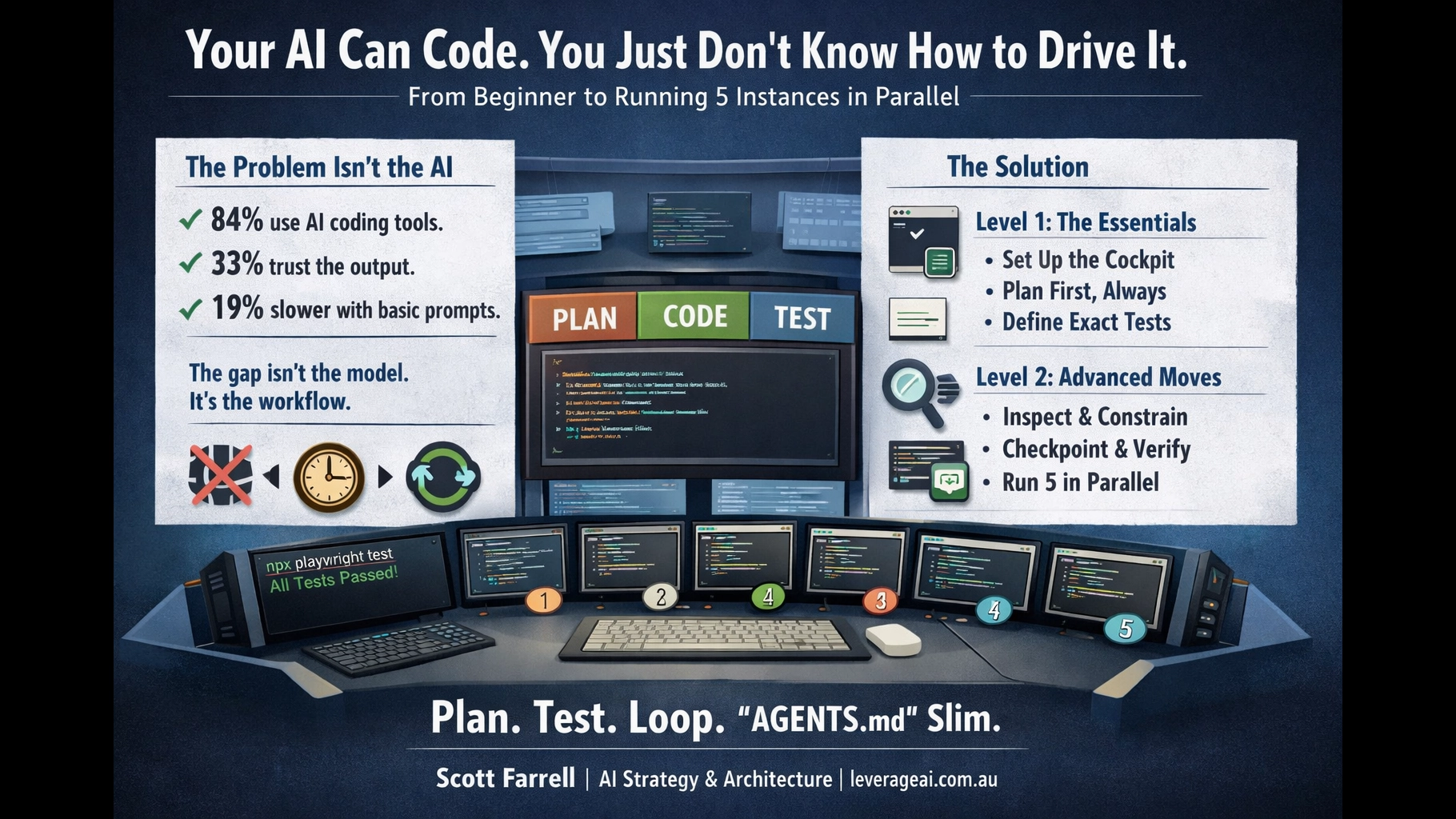
Your AI Can Code. You Just Don’t Know How to Drive It.
A two-level field guide to AI coding agents — from your first session to running 5 in parallel.
AI Strategy & Architecture | leverageai.com.au
TL;DR
- The problem isn’t the AI — a controlled study found experienced developers were 19% slower with AI tools, largely because they skipped planning and verification.1
- The fix is structured driving — plan first, define tests, loop until green. The Claude Code creator reports 2-3x quality improvement from verification loops alone.2
- Fat AGENTS.md files are now an evidence-backed anti-pattern — peer-reviewed research shows they reduce success rates while increasing costs 20%+.3
The Uncomfortable Truth
84% of developers now use or plan to use AI coding tools.4 But only 33% fully trust the code that comes out.5 Positive sentiment for AI tools dropped from 70%+ to 60% in the latest Stack Overflow survey.6
Something isn’t working.
Here’s what is working: at Anthropic, 90% of Claude Code’s own codebase is now written by Claude Code.7 Theo Browne runs 6 parallel instances and hasn’t opened an IDE in days.8 Addy Osmani on Google’s Chrome team writes specs before a single line of code is generated.9
The gap between “AI can’t code” and “AI just built my app” isn’t the model. It’s how you drive it.
METR’s randomised controlled trial found experienced open-source developers were 19% slower with AI tools — yet believed they were 20% faster.1 The study identified the cause: “imperfect use of tools, notably overly simple prompts” and “limited familiarity with AI interfaces.”10
That’s not a tool problem. That’s a driving problem.
What follows is the fix. Two levels: the essentials to get started tonight, and the advanced moves for when you’re ready to run multiple instances in parallel.
Level 1: The Essentials
Seven steps that make AI coding actually work. Do these before anything else.
Set Up the Cockpit
A coding agent without tools is an eager intern sealed inside a glass box. Before you open Claude Code or Codex, make sure the agent can actually do things:
brew— package management (macOS) or your platform equivalentpython+miniconda— scripting, test harnesses, automationplaywright— browser automation for visual testinggh— GitHub CLI for PRs, issues, branch managementnode+npm— if you’re building anything web- A linter and formatter for your language (
ruff,eslint,prettier)
The agent needs to run builds, execute tests, inspect browser output, and commit code. If it can’t do those things, you’re asking it to code with its hands tied.
Always Start in Plan Mode
This is the single most impactful habit. Never let the agent just start coding.
Shift+Tab twice to enter Plan Mode. The agent will analyse your codebase with read-only operations, ask clarifying questions, and propose a plan — before touching any code.11
Boris Cherny, the creator of Claude Code, confirms: “Most sessions start in Plan mode. I go back and forth with Claude until I like its plan. From there, I switch into auto-accept edits mode and Claude can usually one-shot it. A good plan is really important.”2
Make the Plan Vivid
Vague plans produce vague code. Your plan should include:
- What you want done — be specific. Include examples of expected input/output.
- What not to change — don’t introduce new frameworks, don’t refactor unrelated files, don’t add abstractions unless duplication is proven.
- Edge cases — what happens with empty input? Duplicate entries? Network errors?
“Build Tic Tac Toe in plain JavaScript. No framework. Single HTML file. Include: reset button, score tracking across games, winner detection (rows, columns, diagonals), draw detection. X always goes first. The board is a 3×3 grid using CSS grid. Keep it simple — no animations, no AI opponent.”
Cole Medin puts it well: “One line of bad code is just one line of bad code. One line of a bad plan is maybe 100 lines of bad code.”12
Tell It to Search First
Don’t let the agent code from stale memory. Tell it to look things up:
API details drift constantly. The agent’s training data is months old. A 30-second web search prevents an hour of debugging against a deprecated API.
Define How to Test — This Is the Most Important Step
This is where most people fail. Not “add tests.” Not “it should work.” Name the exact commands that prove the thing is alive.
“Write a Playwright test script that proves: (1) X can win via a row, (2) O can win via a diagonal, (3) draws are detected when the board fills, (4) the reset button clears the board and resets scores. Run with npx playwright test.”
The Claude Code creator is unequivocal: “Probably the most important thing to get great results out of Claude Code — give Claude a way to verify its work. If Claude has that feedback loop, it will 2-3x the quality of the final result.”2
You don’t trust the AI. You trust the tests. The test harness is what converts “generating code” into “shipping working software.”
Loop Until All Tests Pass
The loop is the magic, not the model. The pattern is:
- Plan
- Implement
- Run tests
- See failures
- Repair
- Run tests again
- Repeat until green
This is identical to OpenAI’s official Codex architecture: “Plan, edit code, run tools (tests/build/lint), observe results, repair failures, repeat.”13 In one documented run, Codex ran for 25 hours uninterrupted, generated 30,000 lines of code, and continuously verified and repaired as it went.13
Each iteration gets closer because context accumulates. The agent sees its own failures. That’s the mechanism. Don’t interrupt the loop by taking over and manually fixing — let the agent repair its own work.
Review the Plan Before It Codes
Before the agent writes a single line, read the plan it produced in Step 2. Tell it what’s wrong.
- Does this plan cover the edge cases I care about?
- Is there an assumption that will break?
- Are the test criteria specific enough?
- Is the scope too broad? (If yes, narrow it.)
If the agent codes wrong later, your plan was poor. Fix the plan, not the code.
Level 2: Advanced Moves
Workflow controls for when you’re past the basics. These stop the agent from doing clown cartwheels through your repo.
Inspect Before Planning
Before the agent proposes anything, have it explore the repo first. Entry points, dependencies, config files, test commands, build commands, existing conventions.
Anthropic’s engineering team recommends this exact pattern: “explore-plan-code-commit.”14
Constraints, Not Just Goals
Tell the agent what it must not do. This prevents “AI architecture astronaut syndrome.”
- Don’t introduce new frameworks or libraries
- Don’t refactor unrelated files
- Don’t change public APIs unless required
- Don’t add abstractions unless duplication is proven
- Don’t write mocks when real execution is available
Name the Exact Verification Commands
Not “it should work.” Not “add tests.” The exact commands:
Verification:
  - Build: npm run build (must exit 0)
  - Lint: npx eslint src/ (zero warnings)
  - Typecheck: npx tsc --noEmit (must pass)
  - Tests: npx playwright test (all green)
  - Manual: open index.html, click through a game
Cursor’s official best practices say it plainly: “Use typed languages, configure linters, and write tests. Give the agent clear signals for whether changes are correct.”15
Build a Disposable Test Harness First
Before the main implementation, have the agent build a tiny exerciser: a script, a local page, a seeded database runner, a Playwright probe, a curl-based smoke script.
This turns debugging from interpretive dance into a measurable system. The Playwright MCP server now lets coding agents use the browser directly — write tests, run them, see them fail, fix the code, run again.16
Force Checkpointing
After each meaningful step, require a summary: what changed, what passed, what failed, what the next repair step is.
OpenAI’s Codex long-horizon pattern uses exactly this: “Milestones small enough to complete in one loop. Acceptance criteria + validation commands per milestone. Stop-and-fix rule: if validation fails, repair before moving on.”13
Separate Research from Edit Mode
Split the work into phases:
- Research current APIs, patterns, and examples
- Propose approach
- Implement
- Verify
- Repair
This prevents the common failure mode where the agent half-researches while half-editing and produces an elegant pile of nonsense.
Prove the Bug Exists Before Fixing It
Before coding a fix, require a reproduction: a failing script, failing browser flow, failing request, failing sample input. Then the finish line is not “looks fine” but “the reproduction now passes.”
Use Parallelism Deliberately
Boris Cherny runs 5 Claude Code instances in his terminal, numbered 1-5, plus 5-10 more in the browser.17 But not for the same task — each instance works on a separate concern:
- Tab 1: feature implementation
- Tab 2: test writing
- Tab 3: bug fixing
- Tab 4: code review
- Tab 5: documentation
Multiple simple sessions with focused scope beat one overloaded session trying to do everything.
Prefer Logs Over More Prompting
When the agent produces wrong output, don’t write a better prompt. Look at what actually happened.
Logs, screenshots, HTML dumps, API responses, DOM snapshots, SQL outputs, generated files — these beat arguing with the model. Your Playwright setup from Step 1 pays for itself here: take a screenshot, show it to the agent, say “this is what it looks like — fix it.”
Keep Tasks Binary
“Build the app” is not a task. “Create a Tic Tac Toe page with reset button, winner detection, and a Playwright test that clicks through a winning sequence” is a task.
The difference: one has a finish line with teeth. The other is a wish. Keep tasks narrow enough that “done” is either true or false.
The Anti-Pattern: Fat AGENTS.md Files
If you’ve been stuffing your AGENTS.md or CLAUDE.md with pages of instructions, coding standards, framework preferences, and architectural doctrine — stop.
ETH Zurich’s peer-reviewed study (February 2026) tested this directly: LLM-generated context files reduce task success rates compared to providing no context at all, while increasing inference cost by over 20%.3
The findings are specific: “Agents that receive context files run more tests, search more files, traverse more of the repository, and generate more reasoning output. They explore more thoroughly. But thorough exploration isn’t the same as correct exploration.”3
Even human-written context files add 14-22% more reasoning tokens and 2-4 additional steps per task. Following instructions costs compute, regardless of whether those instructions help.3
What to do instead:
- Keep CLAUDE.md slim — only non-obvious, non-redundant information. Tool choices that diverge from defaults. Test configurations that aren’t apparent from the code. That’s it.
- Put instructions in the plan — task-local constraints stay fresh and relevant. Global doctrine gets stale and contradictory.
- A CLAUDE.md that restates the README is probably hurting more than helping.3
Boris Cherny does use a shared CLAUDE.md — but it’s compact, team-curated, and checked into git. When Claude does something wrong, he adds a specific note. That’s institutional learning. A 500-line auto-generated doctrine file is not.2
The live loop beats static scripture. Put instructions where they’re used — in the plan.
Try It Tonight: The Tic Tac Toe Challenge
Open Claude Code (or your agent of choice). Use the Level 1 workflow:
- Enter Plan Mode (
Shift+Tabtwice) - Give it this plan:
"Build Tic Tac Toe in plain JavaScript, no framework.
Single HTML file with embedded CSS and JS.

Requirements:
- 3x3 grid using CSS grid
- X always goes first
- Winner detection: rows, columns, diagonals
- Draw detection when board fills with no winner
- Reset button that clears the board
- Score tracking across games (X wins, O wins, draws)

Constraints:
- No external dependencies
- No animations
- No AI opponent
- Keep it under 200 lines total

Testing:
Write a Playwright test (test.spec.js) that proves:
1. X can win via a row
2. O can win via a diagonal
3. Draws are detected when board fills
4. Reset button clears board and resets scores

Run: npx playwright test
All 4 tests must pass."- Review the plan. Tell it what’s wrong.
- Let it implement. Watch the verification loop.
- When all 4 tests pass, you’re done.
That’s it. You’ll see the difference between “describe and hope” and “plan, test, and loop” in about 20 minutes.
The Bottom Line
AI coding agents are real. 90% of Claude Code’s codebase is written by Claude Code.7 But using them well is “difficult and unintuitive” — even Anthropic’s engineers say so.18
The fix isn’t better prompts. It’s a better workflow:
- Set up the cockpit — give the agent tools it can actually use
- Plan first — always, every time, no exceptions
- Define tests — the exact commands that prove success
- Loop until green — the loop is the mechanism
- Keep AGENTS.md slim — put instructions in the plan, not in doctrine files
If this sounds like good engineering practice — congratulations, it is. The tools changed. The discipline didn’t.
Scott Farrell helps Australian mid-market leadership teams turn scattered AI experiments into governed portfolios that compound EBIT. More at leverageai.com.au
References
- [1]METR. “Measuring the Impact of Early-2025 AI on Experienced Open-Source Developer Productivity.” metr.org/blog/2025-07-10-early-2025-ai-experienced-os-dev-study/ — “When developers are allowed to use AI tools, they take 19% longer to complete issues — a significant slowdown that goes against developer beliefs and expert forecasts.”
- [2]Boris Cherny (Claude Code Creator). “Claude Code Creator Boris Shares His Setup with 13 Detailed Steps.” reddit.com/r/ClaudeAI/comments/1q2c0ne/ — “Give Claude a way to verify its work. If Claude has that feedback loop, it will 2-3x the quality of the final result.”
- [3]ETH Zurich SRI Lab. “Evaluating AGENTS.md: Are Repository-Level Context Files Helpful for Coding Agents?” arxiv.org/abs/2602.11988 via academy.dair.ai/blog/agents-md-evaluation — “LLM-generated context files reduce task success rates compared to providing no repository context at all, while increasing inference cost by over 20%.”
- [4]Stack Overflow 2025 Developer Survey, via Keyhole Software. keyholesoftware.com/software-development-statistics-2026-market-size-developer-trends-technology-adoption/ — “84% of developers now use or plan to use AI tools in their development process.”
- [5]GetPanto. “AI Coding Assistant Statistics 2026.” getpanto.ai/blog/ai-coding-assistant-statistics — “Only ~33% fully trust AI-generated code.”
- [6]Stack Overflow Developer Survey 2025, via GetMocha. getmocha.com/blog/ai-app-builder-statistics/ — “Positive sentiment for AI tools: 60%, down from 70%+ in prior years.”
- [7]Fortune. “Top engineers at Anthropic, OpenAI say AI now writes 100% of their code.” fortune.com/2026/01/29/100-percent-of-code-at-anthropic-and-openai-is-now-ai-written-boris-cherny-roon/ — “For Claude Code, about 90% of its code is written by Claude Code itself.”
- [8]Theo Browne. “You’re Falling Behind. It’s Time to Catch Up.” youtube.com/watch?v=Z9UxjmNF7b0 — “I’m running six Claude Code instances in parallel. I haven’t opened an IDE in days.”
- [9]Addy Osmani. “My LLM Coding Workflow Going Into 2026.” addyosmani.com/blog/ai-coding-workflow/ — “Don’t just throw wishes at the LLM — begin by defining the problem and planning a solution.”
- [10]ACTUIA. “A METR Study Reveals that AI Slows Down Experienced Developers.” actuia.com/en/news/a-metr-study-reveals-that-ai-slows-down-experienced-developers/ — “Imperfect use of tools, notably overly simple prompts; limited familiarity with AI interfaces.”
- [11]Claude Code Official Documentation. “Common Workflows.” code.claude.com/docs/en/common-workflows — “Plan Mode instructs Claude to create a plan by analyzing the codebase with read-only operations.”
- [12]Cole Medin. “My Complete Agentic Coding Workflow to Build Anything.” youtube.com/watch?v=goOZSXmrYQ4 — “One line of bad code is just one line of bad code. One line of a bad plan is maybe 100 lines of bad code.”
- [13]OpenAI for Developers. “Run Long Horizon Tasks with Codex.” developers.openai.com/blog/run-long-horizon-tasks-with-codex/ — “Codex ran for about 25 hours uninterrupted, used about 13M tokens, and generated about 30k lines of code.”
- [14]Elegant Software Solutions. “Plan Mode and Thinking Strategies.” elegantsoftwaresolutions.com/blog/claude-code-mastery-plan-mode-thinking — “Anthropic’s engineering team recommends the ‘explore-plan-code-commit’ workflow.”
- [15]Cursor. “Best Practices for Coding with Agents.” cursor.com/blog/agent-best-practices — “Use typed languages, configure linters, and write tests. Give the agent clear signals for whether changes are correct.”
- [16]Shipyard. “Test-First Development with Agents and the Playwright MCP.” shipyard.build/blog/test-first-development-playwright-mcp/ — “The Playwright MCP server lets your coding agent use the browser — write tests, run them, see them fail, fix the code, and run them again.”
- [17]InfoQ. “Inside the Development Workflow of Claude Code’s Creator.” infoq.com/news/2026/01/claude-code-creator-workflow/ — “Cherny runs many sessions in parallel, including five locally in his MacBook’s terminal and 5-10 on Anthropic’s website.”
- [18]Addy Osmani via Fortune. “My LLM Coding Workflow Going Into 2026.” medium.com/@addyosmani/my-llm-coding-workflow-going-into-2026-52fe1681325e — “Using LLMs for programming is ‘difficult and unintuitive’ and getting great results requires learning new patterns.”
Discover more from Leverage AI for your business
Subscribe to get the latest posts sent to your email.