📘 Want the complete guide?
Learn more: Read the full eBook here →
Look Mum No Hands: Using CRM and Not Looking at Fields
Designing Interfaces for Human-AI Pairs
📘 Want the complete guide?
Learn more: Read the full eBook here →
- Senior developers have stopped looking at code — they supervise diffs and tests instead. The same shift is coming to every data-heavy interface.
- CRM users spend 66% of their time navigating records, 34% deciding. Proposal cards invert this: AI prepares the context, human makes the call.
- The pattern: replace record navigation with decision navigation. Show proposals first, fields on demand.
The Coding Canary
I haven’t seen a line of code in nine months.
Neither has Andrej Karpathy, who coined “vibe coding” — generating code without reading it closely. Neither has Theo Browne, who generated 11,900 lines of production code without opening an IDE.1
This isn’t laziness. It’s a fundamental shift in how senior engineers work. Instead of reading every line, they supervise at a higher level: reviewing diffs, running tests, validating outcomes. The code exists, but they don’t need to look at it.
“The role of ‘software developer’ just changed. Developers describe their role less as ‘code producer’ and more as ‘creative director’. The shift: Strategy (define what’s needed) → Delegation (let AI draft) → Verification (ensure it works).”
— LinkedIn, 20252
What happened? AI tools abstracted the detail layer. Claude Code shows you summaries and test results, not line-by-line code. Cursor presents diffs, not files. The interface shifted from “here’s all the code” to “here’s what changed and whether it works.”
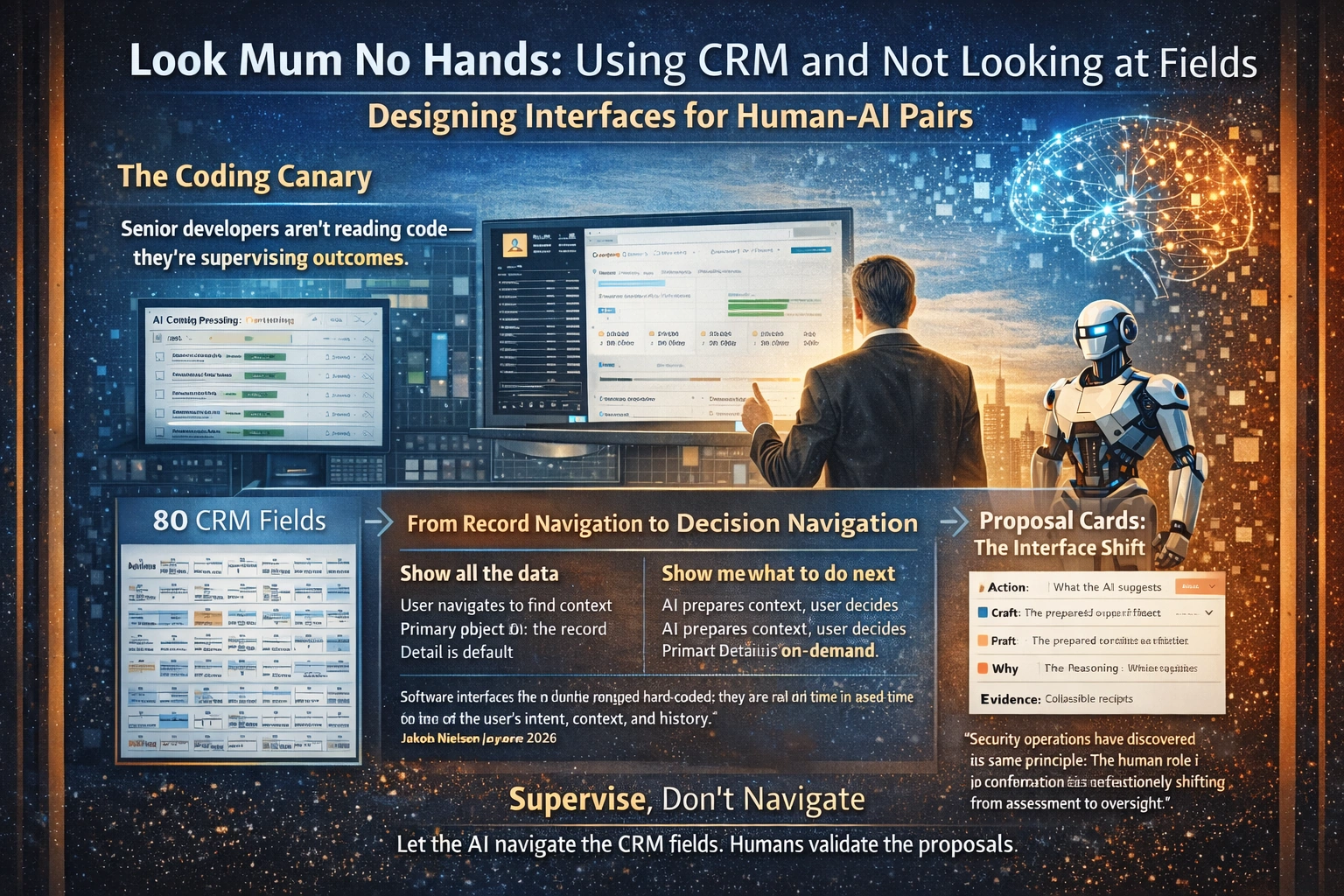
This is the canary in the coal mine. If senior programmers no longer need to see code to code, do CRM users need to see 80 fields to sell?
CRMs Are Databases With Cosplay
Traditional CRMs were designed around a simple premise: show the user all the data, let them figure out what to do.
The result? Sales reps spend only 34% of their time actually selling.3 The rest is administrative tasks and navigating poorly optimized systems.
Here’s the brutal math: an average sales call generates about 6,000 words of conversation, but only 30 to 60 words typically make it into the CRM.5 Your database is filled with surface-level summaries that miss the context that actually matters.
The interface is the problem. CRMs present themselves as “systems of record” — faithful mirrors of reality. But what users actually need is a “system of action” — something that tells them what to do next.
“CRM should be a profit center, not a cost center. If Salesforce only records activity, it is an expense. If it enforces revenue flow, it becomes an asset.”
— LinkedIn6
The coding world solved this by abstracting the artifact. You don’t read the code; you read the summary. You don’t navigate files; you review proposals. The same medicine applies to every data-heavy interface.
From Record Navigation to Decision Navigation
The shift happening in coding isn’t coding-specific. It’s a change in the unit of interaction.
| Record Navigation | Decision Navigation |
|---|---|
| Show me all the data | Show me what to do next |
| User navigates to find context | AI prepares context, user decides |
| Primary object: the record | Primary object: the proposal |
| Detail is default | Detail is on-demand |
| User spelunks | User supervises |
This isn’t just a cleaner UI. It’s a different design primitive. The interface stops asking “what do you want to see?” and starts asking “what do you want to decide?”
Jakob Nielsen predicts 2026 as the year this shift accelerates:
“The concept of a static interface where every user sees the same menu options, buttons, and layout, as determined by a UX designer in advance, is becoming obsolete… Software interfaces are no longer hard-coded; they are drawn in real-time based on the user’s intent, context, and history.”
— Jakob Nielsen, 2026 Predictions7
The Two-Pane Cognition Model
Human-AI pair interfaces need a new architecture. Call it “two-pane cognition”:
Human Pane: Outcomes, priorities, approvals, exceptions, judgment calls. What only humans can decide.
AI Pane: Drafts, proposals, evidence, confidence signals, “here’s what I tried.” The pre-work that used to require spelunking.
Shared Surface: Constraints, permissions, acceptance criteria — the contract between human and AI.
This model comes from observing how senior engineers work with AI coding tools. They don’t read all the code; they read the proposal (diff), check the evidence (tests), and make a judgment (approve/reject/modify).
The same pattern applies to CRM:
- Proposal: “Call John tomorrow. Ask about Q2 budget timeline.”
- Evidence: “Last touch 17 days ago. He mentioned procurement in your last email. Champion changed roles.”
- Judgment: Approve, modify, or reject — with full record one click away.
The human is still in control. But the human isn’t navigating. The human is supervising.
Proposal Cards: The New Primitive
The interaction primitive for decision navigation is the proposal card. Every card has four parts:
| Component | What It Contains |
|---|---|
| Action | What the AI suggests doing: “Call John”, “Send follow-up”, “Update stage to Negotiation” |
| Draft | The prepared artifact: email copy, call agenda, proposal skeleton |
| Why | The reasoning: “17 days since last touch; procurement mentioned Q2 budget” |
| Evidence | Collapsible receipts: the specific data points the AI used |
The key insight: detail is progressive, not default. The card shows the decision-ready summary. Click to see the evidence. Click again to see the full record. Most of the time, you never need to go past the first layer.
This is exactly how modern coding tools work. You see the diff summary. Click to see the changes. Click again to see the full file. Most of the time, the summary is enough.
Why This Builds Trust, Not Destroys It
The obvious objection: “Users want to see the data. They don’t trust AI.”
But trust doesn’t come from showing everything. Trust comes from showing the receipts. When AI presents a recommendation, the question isn’t “what’s all the data?” — it’s “why did you suggest this?”
Proposal cards answer that question directly. The “Why” and “Evidence” sections make the AI’s reasoning inspectable. If something looks wrong, drill down. If it looks right, approve and move on.
This is the same pattern that made AI coding tools trustworthy. You don’t review every line of generated code. You review the diff, check the tests, and verify the behavior. The abstraction layer builds trust by making verification efficient.
Security operations have discovered the same principle:
“The human role is fundamentally shifting from assessment to oversight. Traditionally, analysts spent 15 to 30 minutes per alert gathering context and deciding next steps… At the highest level of autonomy, analysts transition from reviewing individual alerts to managing a team of agents, auditing their output weekly or monthly rather than operating in a constant triage cycle.”
— Detection at Scale8
The human remains in the loop. But the loop itself has changed — less time triaging, more time governing.
Supervise, Don’t Navigate
The new workflow pattern is “supervise, don’t navigate.”
Old CRM day:
- Open account record
- Read activity history
- Open related contacts
- Check opportunity stage
- Review last emails
- Decide what to do
- Execute action
- Log the activity
New CRM day:
- Review proposal queue
- Approve, modify, or reject each card
- Handle exceptions
- Adjust strategy when patterns emerge
The cognitive load shifts from “find the relevant information” to “evaluate the recommendation.” The first requires navigation. The second requires judgment. Humans are much better at judgment.
This is why the “look mum no hands” metaphor works. Riding a bike without hands isn’t about being reckless. It’s about trusting the system enough to operate at a higher level. Your hands aren’t on the handlebars because you don’t need them there. The bike is stable. You’re supervising, not steering.
The Governance Advantage
Proposal cards aren’t just faster — they’re easier to govern.
When AI prepares proposals for human review (design-time AI), you get natural checkpoints. The human sees the recommendation before it executes. If something looks wrong, they catch it.
Compare this to AI that navigates and acts on its own (runtime AI). There’s no review gate. The AI makes decisions in flight, and you find out what happened after the fact.
This is what I call “governance arbitrage” — routing AI value through existing review mechanisms rather than inventing new ones. The proposal card is the review gate. Approve it, and execution happens. Reject it, and nothing changes.
For regulated industries, this is a significant advantage. You can audit what the AI recommended, what the human approved, and what actually executed. The paper trail is built into the interaction pattern.
What Changes If You Get This Right
For individuals: 10x faster time-to-decision. The cognitive load shifts from “find” to “evaluate.” You spend your attention on judgment, not navigation.
For teams: Standardized proposal format enables faster handoffs and consistent quality. When everyone reviews the same card structure, onboarding is faster and quality is more predictable.
For the industry: Enterprise software moves from “system of record” to “system of action.” The CRM stops being a database you navigate and starts being a decision engine you supervise.
How to Start
Pick one workflow. Probably your highest-volume, most routine decision path. Design the proposal card for that workflow.
Ask three questions:
- What action does the user typically take? That’s your “Action” component.
- What do they need to see to feel confident? That’s your “Why” and “Evidence” components.
- What artifact do they produce? That’s your “Draft” component.
Build the card. Hide the fields. Make drill-down available but not default.
Then watch what happens. Users will tell you what’s missing. But they’ll also tell you what they never needed to see in the first place.
The coding world learned this by accident. AI tools abstracted the code, and engineers discovered they didn’t need to see it. You can learn it on purpose. Design for proposals. Hide the fields. Let your users ride without hands.
References
- Medium. “Claude Code is Redefining Software Engineering Faster Than We’re Ready For.” — “11,900 lines of production code generated without opening an IDE on the $200/month Claude Code tier” medium.com/@ajepym/claude-code-is-redefining-software-engineering-faster-than-were-ready-for-da1a110b5567
- LinkedIn. “Switching to Claude Code Boosts Dev Team Productivity.” — “The role of ‘software developer’ just changed… Developers describe their role less as ‘code producer’ and more as ‘creative director'” linkedin.com/posts/md-mukthar-8239b2278_i-quietly-switched-my-remote-dev-team-and-activity-7413165586949525504-A7aE
- Revenue Grid. “How to Customize Salesforce for Maximum Efficiency.” — “Studies show that sales reps spend only 34% of their time actually selling, with the rest consumed by administrative tasks and navigating poorly optimized systems” revenuegrid.com/blog/enhance-your-experience-how-to-customize-salesforce-for-maximum-efficiency/
- LinkedIn / xdge. “Automate Salesforce with xdge for Real-Time CRM Accuracy.” — “In 2025, the average rep wasted 286 hours per year on manual data entry—instead of selling” linkedin.com/posts/xdge-ai_at-xdge-our-sales-operations-run-on-autopilot-activity-7413418154560761859-S-XN
- Gong. “Why AI Systems of Action Replace Traditional CRM Workflows.” — “An average sales call generates about 6,000 words of conversation, but only 30 to 60 words typically make it into the CRM” gong.io/blog/crm-system-of-record-vs-ai-system-of-action
- LinkedIn / Ameet Patra. “A Different Perspective on ServiceNow vs Salesforce.” — “CRM should be a profit center, not a cost center. If Salesforce only records activity, it is an expense. If it enforces revenue flow, it becomes an asset.” linkedin.com/posts/ameet-patra_a-different-perspective-on-servicenow-vs-activity-7411369617350225920-O6DF
- Jakob Nielsen. “18 Predictions for 2026.” — “The concept of a static interface where every user sees the same menu options, buttons, and layout… is becoming obsolete. 2026 is the year we start the shift to Generative UI.” jakobnielsenphd.substack.com/p/2026-predictions
- Detection at Scale. “AI Security Operations 2025 Patterns.” — “The human role is fundamentally shifting from assessment to oversight… At the highest level of autonomy, analysts transition from reviewing individual alerts to managing a team of agents” detectionatscale.com/p/ai-security-operations-2025-patterns
Scott Farrell helps Australian mid-market leadership teams turn scattered AI experiments into governed portfolios. leverageai.com.au
Discover more from Leverage AI for your business
Subscribe to get the latest posts sent to your email.