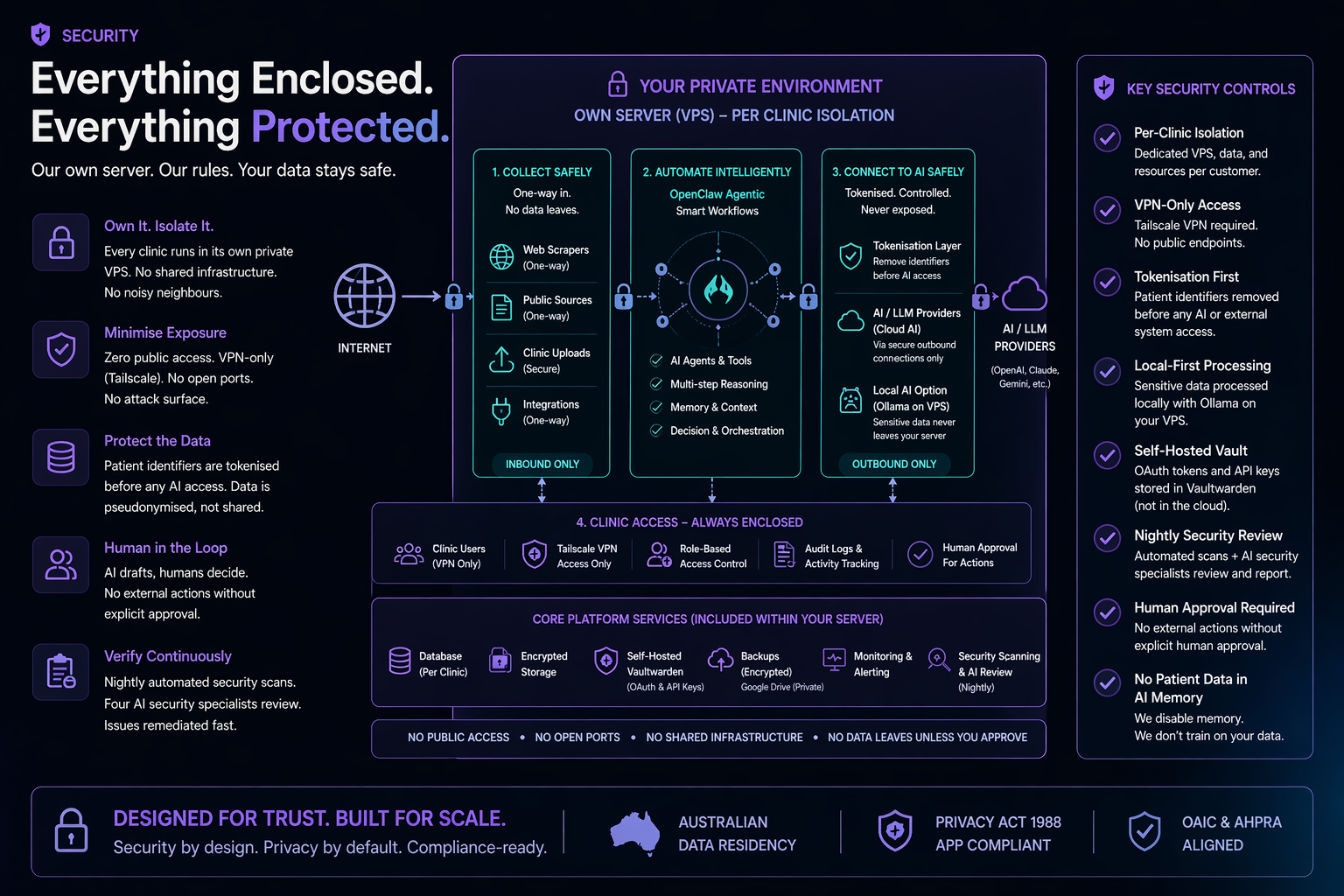
Why clients can trust this.
Internal explainer for the team. Know it. Sell it. Mean it.
Scope: how we protect private and regulated business data — patient records, emails, calendars, analytics, internal operations.
The other side of the AI coin
AI is only useful if you can trust it. Power is one half of the equation — privacy, safety, and compliance are the other. One doesn’t work without the other.
Every advantage AI brings — faster answers, better decisions, work that runs while you sleep — comes with a matching obligation: protect the data it touches, follow the rules of the industries you operate in, and never trade privacy for convenience. That is the frame this whole system is built inside.
Everything runs on a server you own. Nothing shared. Nothing pooled.
Private data takes the shortest, most direct path. Convenience never trumps protection.
Built for the rules of the industries we serve — not bolted on after a scare.
The complicated parts — setup, scopes, rule changes — are our job, not yours.
AI, left to its defaults, is not built for regulated industries. An off-the-shelf AI assistant will happily:
These are the inherent risks of plugging raw AI into a business — every provider, not just one.
A small business owner shouldn’t need a compliance department to use AI safely. That’s our job. We read the rules, map where AI will trip over them, and build the guardrails before you ever see a problem. You get the upside. We take the regulatory weight.
The concrete architecture below is how we deliver on all of that, starting with one foundational choice: every client gets their own isolated server. Not a shared environment. Not a container on someone else’s machine. A full Linux server, hardened from the ground up, with nothing exposed to the public internet.
"Your data is on your server. Not ours. Not shared with anyone else."
Per-client VPS isolation
Every customer runs on their own separate Linux server — a private VPS with its own operating system, its own firewall, and its own data. This is the foundation everything else builds on.
Most AI platforms pool every customer’s data into one shared system. One hole in that system exposes everyone at once. We give each client their own private machine — there is no shared system to break into, and a problem at another client’s end cannot reach yours.
This is the fundamental difference. When you connect your Google account, your Carestack, your social media — you're granting access to your own server instance. Not our cloud. Not a shared platform. A separate Linux install provisioned for you, with full admin credentials.
We set it up, harden it, and hand you the credentials. If you ever want to walk away, the data is yours. There's nothing to "export" — it's already sitting on your server. We can hand over full control or migrate to hardware you own.
One Linux VPS per customer. Separate operating system, separate processes, separate database. No shared application layer. No noisy neighbours. Each server is its own isolated environment — not a partition of someone else's.
Standardised Linux install with locked-down ports, strict firewall rules, no unnecessary services running. Every server gets the same hardening treatment — it's automated, not manual. Nothing left to chance.
All services bind to the Tailscale VPN network only. No open ports. No public endpoints. No web-facing admin panels. The server simply doesn't exist on the public internet.
Australian clients get a Sydney VPS. Patient data stays in Australia — not by policy or promise, but because the server is physically in Sydney. There's no mechanism for data to leave.
"You're not granting access to our cloud service. You're granting access to your own server. We hand over the keys."
VPN-only access via Tailscale
Every connection to the server goes through Tailscale — a modern mesh VPN. No exceptions.
Every major breach starts with a server that is visible online. Ours isn’t. The automated attacks that constantly scan the internet looking for weak targets never find us — there is nothing on the public internet to find. An entire category of attack simply doesn’t apply.
Each device on the network is cryptographically authenticated. You can't just know the address — your device has to be explicitly authorised to connect.
All traffic is encrypted end-to-end through the VPN tunnel. Even if someone intercepted the network traffic, they'd see encrypted noise.
No open ports. No public endpoints. No attack surface. Even the management interface (OpenClaw Gateway) requires both VPN access and a valid authentication token.
Compare this to typical AI SaaS: public login pages, API endpoints exposed to the internet, shared infrastructure. Our clients have none of that.
PII / PHI scanner — Australian identifiers
An offline scanner that detects sensitive personal and health information across the entire system. Runs nightly. Fully local — no data leaves the server.
Under the Privacy Act, even accidental exposure of a Medicare number is a notifiable data breach. The health sector reports more breaches than any other industry in Australia. This scanner catches leaks before they become incidents — and it runs every night, not once a year.
Built on Microsoft Presidio (open source, MIT licensed). Runs entirely offline — no API calls, no data leaving the server.
Australian identifiers use checksum validation, not just pattern matching. It validates Medicare numbers with the same algorithm Medicare uses. It doesn't guess — it mathematically confirms.
Critical design: findings are redacted before output. Real PII never enters the security report, never reaches the AI. The scanner reports that it found something, not what it found.
OpenClaw workspace and memory. Social tracker data. Published web reports. Collected website pages and blog posts. Council data assembly. Every .md, .txt, .log, .csv, .html, and .env file on the system.
"The scanner validates Medicare numbers with the same algorithm Medicare uses. It doesn't guess — it mathematically confirms."
CDP de-identification proxy
When the AI connects to patient management systems (like Carestack), a local proxy sits between the connection and the AI. It strips all patient identifiers before the AI sees anything.
Think of it like Blu-ray HDCP encryption — data flows through every component encrypted, and only the TV screen decrypts it.
We strip all traces of private data before it ever leaves your server. The AI only ever sees anonymous tokens — there is nothing personal for it to leak, log, or expose. That also sidesteps a serious compliance trap: sending patient data to an overseas AI service triggers APP 8 cross-border disclosure, and the practice is left legally liable for whatever happens to that data abroad. Tokenisation removes the event entirely — no disclosure, no transfer, no overseas liability.
OpenClaw can work freely across bookings, medical records, patient notes — whatever it needs. All personal data is replaced with anonymous tokens before the AI sees it. A name becomes [name_a3f9], a date of birth becomes [dob_7e21]. The AI works with these tokens just as effectively — it can compare, sort, summarise, flag issues — without ever knowing the real data behind them. And it’s safe by default: even if the AI wanders into a medical record you didn’t point it at, there’s nothing to leak. It’s blind to the personal information, but fully capable of doing its job.
Patient names. Dates of birth. Medicare numbers. Phone numbers (mobile and landline, AU and international format). Email addresses. Street addresses. Individual Healthcare Identifiers (IHI). Tax File Numbers. Credit card numbers.
Clinical codes and treatment types. Appointment dates and times. Financial amounts. Page structure and workflow steps. Error messages and system status. Everything it needs to work — nothing it shouldn't know.
Everything else — AI prompts, responses, disk writes, dashboards, project boards, council reports, backups — stays tokenised. Always.
"The AI never sees a patient's name. Not in memory. Not in logs. Not in reports. Only the dentist's screen and the patient's own phone see the real data."
Vault encryption: AES-256-GCM authenticated encryption (NIST SP 800-38D) with unique random 96-bit nonces per record. HMAC-SHA256 token derivation. All PII encrypted at rest in PostgreSQL — the database never stores plaintext.
12-point nightly review + AI security council
A 12-point infrastructure audit runs every night at 3:30 AM. Then four AI security specialists argue about what they found.
The average time to detect a breach in Australia is 163 days. That's five months of exposure before anyone notices. A nightly audit compresses that detection window to 24 hours maximum. Issues found tonight are flagged by morning.
Port lockdown. Firewall rules. Backup verification. Service health. Tailscale status. PII scan results. OpenClaw security audit. Version checks. Log review. Error analysis. Certificate status. Configuration drift detection.
What could an attacker exploit? Thinks like a hacker trying to break in.
Are protections adequate? Reviews each control and asks whether it's actually working.
Is sensitive data handled correctly? Checks every data flow against privacy requirements.
Are security measures practical or just theatre? Catches controls that look good on paper but don't work in practice.
"Most businesses get a security audit once a year. Our clients get one every night."
3-stage prompt injection defence
When the AI reads external content — emails, web pages, social media — attackers can try to hide instructions in that content. We have three layers of defence.
Prompt injection is the single biggest security risk facing AI today — ranked #1 by the industry body that tracks these threats. An attacker hides instructions inside an email or a web page, and an unguarded AI follows them instead of yours. Without defences, a single malicious message could cause the AI to leak confidential data or take actions it was never asked to take.
Code-based, not AI-based
Traditional regex-based scanning reads all external content before the AI ever sees it. Known injection patterns are stripped. This layer doesn't need to be smart — it just needs to be fast and thorough.
Isolated, AI-reviewed
External data is placed in complete isolation — it cannot access anything else in the system. The most capable AI model available scans the quarantined content and assigns a risk score. The scanner itself is sandboxed.
Score-based decision
High confidence of safety → proceed. Low confidence → block and log reason. Any attempt to change config or system behaviour → ignore and report as an injection attempt. No grey area on config changes — those are always blocked.
Email-specific: all incoming email content is sanitised before AI classification. SSRF prevention: only http/https URLs accepted — file://, ftp://, javascript://, data:// schemes are rejected.
"External content goes through three security checkpoints before the AI reads it. Most systems have zero."
Data classification & access control
Not all data is equal. The system classifies everything into three tiers and enforces access based on context — who's asking, and through which channel.
AI assistants that can access everything and share anything are a liability. One message in the wrong channel and confidential financials, patient details, or strategic plans are exposed. Context-aware classification means the system enforces boundaries even when humans forget to.
Owner direct message only.
Financial figures, CRM contact details, deal values, daily notes, personal emails, system memory.
Team channels OK, no external.
Strategic notes, council recommendations, tool outputs, knowledge base content, project tasks, system health.
Already out there. Safe to share.
Social media posts, website content, press releases, general knowledge answers. Information the world already sees — handled with relaxed controls because there’s nothing sensitive to protect.
The system knows if it's in a DM, group chat, or external channel. Data surfaces accordingly. When the context is ambiguous, it defaults to the more restrictive tier. Never the other way.
All outgoing messages are scanned for personal data, credential-looking strings, and sensitive information. Two layers: deterministic (pattern matching) AND AI-based (contextual understanding). Both must pass.
The AI does NOT send emails on behalf of the owner — drafts only. Does NOT post to social media without explicit approval. Does NOT write to external systems (email, calendar, CRM) without permission. Every external action requires a human in the loop.
OpenClaw standard precautions
On top of everything we've built, OpenClaw itself ships with security precautions baked in.
Most real-world breaches aren’t glamorous. They’re passwords accidentally committed to code, login details pasted into the wrong log file, sensitive secrets left sitting in plain text. Not sophisticated attacks — mundane mistakes. These are the basics most AI deployments skip. We don’t.
Every request to the gateway requires a valid authentication token. No token, no access.
Sensitive files like .env are locked to owner-only read (chmod 600). Not readable by other users or processes on the server.
Git hooks block API keys, bearer tokens, OAuth tokens, and other credential patterns from ever being committed to version control.
Secrets are never stored in log files and never sent to messaging channels. Environment files are excluded from version control.
Parameterised queries across all database operations. No raw string concatenation in SQL.
The system checks for OpenClaw updates but requires explicit approval before applying them. No silent auto-updates.
Encrypted credential vault — Nango, self-hosted per VPS
When you connect Google services (YouTube, Analytics, Gmail, Calendar, etc.), the OAuth tokens that grant access are stored in Nango — an industry-standard OAuth vault — running in Docker on your own VPS. Tokens are never in plain text, never in config files, never in the AI’s memory.
You sign into your own server. It holds your keys securely, and talks directly to the services you use on your behalf. No middleman, no SaaS, no complicated configuration. Simple by design. Safe by default.
Every other platform hands you a 45-minute homework assignment — create a Google Cloud project, pick from 85 OAuth scopes, install the gcloud CLI, debug a keyring, wrangle token files. We built a wizard that collapses that into one click.
Here is the trick: convenience and privacy are not a trade-off. The Google Cloud setup is ours (done once, maintained for every client). The wizard, the token, and your data all stay on your VPS. Nothing about your connection ever takes a detour through our servers.
The data path is the same one your own browser uses when you log into Google. Nango sits alongside, holding the OAuth token under lock and key — it never becomes a middleman in the data flow.
We do not route your private data through a third party. Many managed-OAuth services get convenience by proxying every request — every email, every calendar event, every document flows through their servers, gets decrypted on their infrastructure, and lives in their logs, caches, and breach radius. That is a second custodian of your data, and a second place it can be compromised. Our approach keeps the data path direct between your VPS and Google, identical in risk profile to you logging in through a browser. There is no second custodian. The privacy and security surface is not extended.
Every OAuth token is encrypted with AES-256-GCM before it hits the database. The encryption key is stored separately from the data.
Google tokens expire every hour. The credential manager automatically refreshes them in the background — no manual intervention, no expired token errors, no credential files to manage.
Disconnect any service instantly from the setup page. The token is deleted from the vault immediately — not just marked inactive, actually removed.
The credential vault is only accessible from localhost on your server. It does not listen on any public port and cannot be reached from outside the VPN.
Each service requests only the permissions it needs. YouTube gets read-only analytics. Calendar gets read-only events. No service gets more access than its specific purpose requires.
OAuth tokens are never passed to the AI model. The AI requests data through server-side code that handles authentication — the model never sees, stores, or can leak an access token.
Your data flows directly between your VPS and Google over HTTPS — identical to logging in through a browser. Nango holds the token; it never sits in the data path. No third-party proxy, no second custodian, no extended breach radius.
"Your Google credentials are encrypted at rest, auto-refreshed, accessible only from localhost, and never exposed to the AI. Disconnecting a service deletes the token permanently."
Encrypted hourly backups
Hourly automated backups. Encrypted before they leave the server. Two layers of protection even if someone compromises the backup destination.
Ransomware doesn't just encrypt your data — it targets your backups first. Offline, encrypted backups that are verified hourly mean you can recover from a worst-case scenario without paying a ransom or losing more than an hour of data.
Runs hourly. Auto-discovers all databases on the system — no manual configuration needed. Bundles into an encrypted archive and uploads to Google Drive.
Two-layer encryption: Google Drive access credentials + separate archive password. You can't get to them even if you know where they are.
Git autosync runs hourly — auto-commits workspace changes and pushes to the remote repository. Complete version history preserved.
Pre-commit hooks ensure no credentials make it into the repository. Browser profile cookies blocked from commits.
Privacy Act, AHPRA, HRIP Act compliance
We're building for regulated industries. Australian dental is the first — and it has some of the strictest rules on earth.
A dental practice that uses AI to process patient data without proper controls faces up to $50 million in penalties under the Privacy Act — and since June 2025, patients can sue directly. These aren't theoretical risks. The OAIC is actively running compliance sweeps on health providers right now.
All 13 Australian Privacy Principles apply. Health service providers have no small business exemption. Penalties up to $50 million, or 30% of annual turnover, or 3x the benefit gained — whichever is highest.
New statutory tort (June 2025): patients can now sue directly for serious privacy breaches.
The strictest healthcare advertising rules globally. Patient testimonials prohibited. Before/after photos need specific disclaimers. Can't even reply "thank you" to a review that mentions treatment outcomes.
Our Regulations Advisor scans all public content every night at 5 AM.
Additional health privacy requirements for NSW practices. 7-year record retention for adults. Records for minors kept until the patient turns 25. Must log disposal or transfer of records.
Health sector is #1 for reported data breaches nationally (18% of all notifications). Health providers are covered regardless of turnover. Contain immediately, assess within 30 days, notify within 30 days.
This is the big one for AI. If patient data crosses a border, the practice remains accountable for any breach by the overseas recipient. Our answer: Sydney VPS keeps data in Australia. CDP proxy tokenises patient identifiers before they reach any AI model. The AI processes tokens, not people.
This is why we take it seriously. Not because compliance is a feature to market — because getting it wrong costs a dental practice $50 million and its reputation.
Currently evaluating full encryption at rest to complete the triple layer.
If someone physically accesses the server — a data centre employee, a stolen drive, a decommissioned disk — unencrypted data is immediately readable. Encryption at rest means even physical access to the hardware reveals nothing without the decryption key.
Tailscale encrypts all network traffic. Already done.
CDP proxy tokenises patient data. Token vault uses AES-256-GCM. Already done.
LUKS full-disk encryption for cloud VPS. Under evaluation.
FileVault full-disk encryption enabled by default on macOS. Already done for local AI deployments.
"For larger clients on dedicated Mac Mini hardware, encryption at rest is already solved — FileVault ships enabled. VPS encryption is next."
Local inference — for data that shouldn't leave the building
Some operations are too sensitive to send anywhere, no matter how the traffic is protected in transit. Local AI runs on the practice's own hardware, so patient data never leaves the premises.
The most sensitive data — patient records, clinical notes — never leaves your office. It doesn’t cross a network. It doesn’t land on someone else’s server. It doesn’t appear in anyone’s log files. There is no cross-border transfer to assess, no vendor to audit, no breach notification to draft — because the data never left the room.
Three things converged in early 2026 to make this practical for small business:
A Mac Mini M4 Pro (32 GB) runs 27–31B parameter models at 12–18 tokens/sec. Cost: ~AUD $3,000. Fits on a desk, runs silent. The upcoming M5 Pro (mid-2026) doubles AI throughput again.
Google's Gemma 4 (April 2026) — open source, Apache 2.0. The top 31B model fits in 20 GB of RAM thanks to joint optimisations between Google and the Ollama team. It supports tool use and function calling, and benchmarks competitively with models 5× its size. It can do real agent work.
OpenClaw natively connects to local model backends (Ollama, llama.cpp). Our routing layer (LiteLLM) already directs traffic between providers — adding a local inference endpoint is a config change, not a rebuild.
Patient data leaves the building. Even encrypted in transit, it's processed on someone else's server.
Patient data never leaves the building. Processed on hardware the practice owns.
Read and summarise clinical notes without tokenising names, dates, or conditions. The AI runs on the practice's own hardware — nothing to redact because nothing leaves.
Previously, you couldn't ask an AI "did we catch all the PII?" — because asking the question is the breach. With local inference, you can have a second AI pass review tokenisation output, flag missed identifiers, and confirm redaction quality. The check is no longer the risk.
When we need to rehydrate tokenised PII for a report or letter, local AI can validate and format the output without the real data ever touching a cloud model.
Local models are slower than cloud. That's fine for batch jobs — compliance reviews, document classification, bulk record processing — that run overnight.
Tasks previously closed for security reasons — like AI-assisted treatment planning or insurance pre-auth — become viable when processing is guaranteed private.
At GTC 2026, NVIDIA CEO Jensen Huang announced NemoClaw — an enterprise security layer built on top of OpenClaw (the platform our system is built on). Jensen called OpenClaw "the operating system for personal AI."
NemoClaw uses the same architecture we're describing: a policy-enforced gateway that routes requests between local inference and cloud models based on data sensitivity. NVIDIA pairs it with their DGX Spark hardware (~USD $3–4K). We achieve the same outcome with commodity Apple Silicon and open-source models — no vendor lock-in.
"Tokenisation protects what leaves. Local inference reduces what has to leave in the first place. Together, they create a tighter privacy and security architecture for sensitive AI workflows."
Every layer, when it runs, what it does.
| Layer | What | When |
|---|---|---|
| VPS Isolation | Dedicated server per client | Always |
| VPN Only | Tailscale, no public internet | Always |
| CDP Proxy | Patient data tokenised at source | Every connection |
| PII Scanner | Australian identifiers with checksum validation | Nightly |
| Security Council | 4-perspective AI security audit | Nightly 3:30 AM |
| Regulations Advisor | AHPRA / Privacy Act content scan | Nightly 5:00 AM |
| Prompt Injection | 3-stage defence on external content | Every input |
| Access Control | 3-tier data classification | Every message |
| Encrypted Backups | Dual-encrypted to Google Drive | Hourly |
| Local AI Inference | On-premise private AI for sensitive tasks | Per-request routing |
| Encryption at Rest | VPS: LUKS full-disk (coming soon). Mac Mini: FileVault enabled by default | VPS soon / Mac ✓ |
"Security isn't a feature we added. It's the architecture we started with."